
Industrial warehouse management for a plastics compounder
In a plastics plant the hard question is not how much is in stock but why it changed. The same bag o...
View Details →Why Not Excel
A standard-parts plant talks about how many units it made today. A custom plant talks about whose building this one is for. Measure the customer's bay, and the parameters are set; change one parameter and the girder length, motor rating and rope length all move with it. The BOM is not fixed, the drawing is redrawn for every unit, and material is gathered per machine — a spreadsheet can hold a row of numbers, but it cannot hold the relationship between those three things.
As wide as the bay, as long as the girder. One metre changes the girder, the rail and the conductor bar — so it is entered per project, never held as standard stock.
Capacity decides motor rating and rope size. Ten tonnes and sixteen tonnes differ by a dozen mechanical lines; mixed into one BOM, the wrong material gets issued.
Colour is not decoration, it is an acceptance item. RAL 1028 and RAL 2004 are two purchasing lines; spray the wrong one and the whole machine is reworked.
The hard part of IT in custom manufacturing is never data entry: it is that one machine's information sits with four different people — drawings with design, progress with the shop, the material list with purchasing, receipts with the warehouse. There is only one thing to build first: a number they all share. The documents grow from there.
The Console
You sign in to a dark sidebar and a white work area. Six groups: design, production, purchasing, stock, master data, administration — seventeen pages. It looks like six systems; it is one line with six stations: design releases drawings, production works from them, purchasing buys from the lists, the warehouse receives against documents, and master data is the dictionary they all share. The top right always says who you are, which department and which role — because the same screen shows different things to a foreman and a buyer.
First Screen
Three panels on the home screen: all work orders 10, completed 3, open 7. Below them, a thirty-day curve of new orders; bottom right, a ring — teal completed, purple open. The numbers are not new; what is new is that nobody types them. Change an order's status and the panels follow. The two sentences that used to start every weekly meeting — how many are on the floor, which ones will slip — now end with a finger pointed at the screen.
“Open 7” is not “late 7”. Late means comparing the promised date to today, and the order list prints those dates in red — the dashboard answers how many, the list answers which ones. Keeping the two apart removes one round of excuses per meeting.
The Spec Sheet
Open the order list and the filter bar does not look like a back office. It looks like the title block of a mechanical drawing: colour, crane model, quantity, capacity, span, lift height, duty class, hoist two-speed or VFD, long-travel two-speed, cross-travel single-speed, control mode, hoist power, mounting, long-travel motor make / model / rating, cross-travel motor make / rating — plus project number, order number, contract number and delivery date.
Sets girder length and rail; it maps one-to-one to a bay and almost never repeats.
Sets motor rating and rope size, and it is where the quotation starts.
Drives drum rope capacity and column height; get it wrong and it will not fit.
How often it lifts decides single or two-speed, VFD or contactor.
An acceptance item and a purchasing line at the same time.
Long travel, cross travel, hoist — three sets; change the make and the spare-parts system changes with it.

When after-sales calls, they never quote an order number. They say “the ten-ton, sixteen-five span, RAL 1028 machine”. Finding a machine by its body is what finding it actually means — the whole reason physical parameters belong in the search fields instead of a remarks box.
Seven Moves
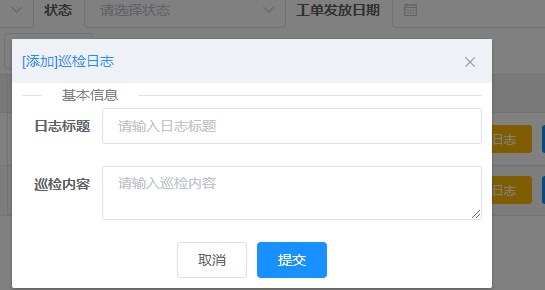
Create the order, upload drawings, break the drawings down, dispatch to departments, log patrols, complete, receive and dispatch. Seven moves, seven kinds of people: designer, detailer, foreman, inspector, storekeeper. The system does not score who is fast; it guarantees that every step has a time, a person and an attachment — and when something goes wrong, those three settle more arguments than any explanation.
Break It Down
The breakdown step is the waist of the system. One machine splits into two things: extra parameters (double girder, steel structure — LH10-10.7m, six units; three steel structures) and mechanical and electrical lists (girder s=10.6m, six pieces; long-travel motors, three; transformer, one). At that granularity purchasing knows what to buy, the warehouse knows what to receive and the shop knows what to draw — if it does not break down to parts, the system is only a ledger.
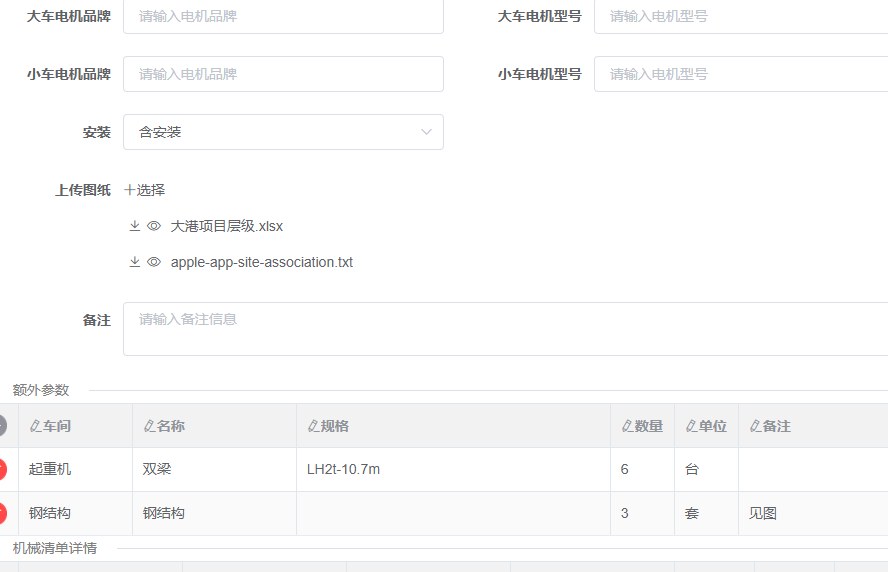
The risk is not breaking down too coarsely; it is that nobody accepts the result. So the list is not an attachment, it is table rows with code, unit and quantity — which become shortage requests next, and purchase orders after that. Break one link and this machine's material stays on the road forever.
The Alarm
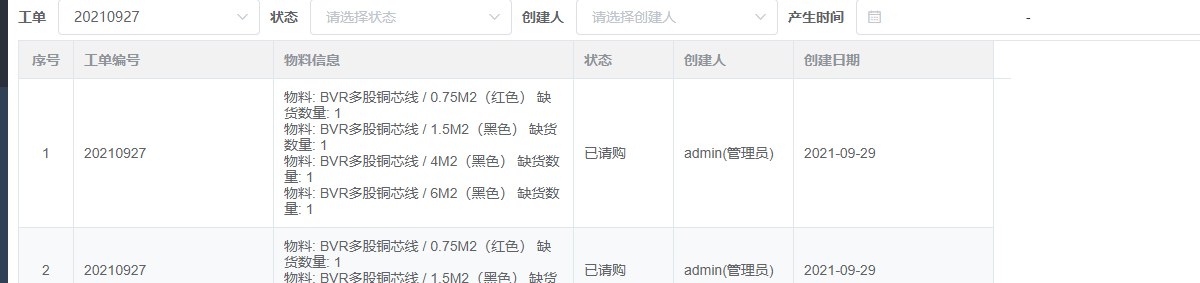
When the shop finds material missing, nobody phones and nobody posts in a group chat. They write a shortage request: what is short and how much (BVR copper wire 0.75M2 red, one roll; 1.5M2 black, one roll; 4M2 black, one roll), and the document carries the order number. Purchasing raises a purchase order straight from it, fills in supplier, price and date; when goods arrive, the receipt inherits the purchase number. Enter once, reuse three times, and the three documents point at the same machine.
Paper Relay
The step where paper gets lost is not filling it in, it is after it leaves your hand. The system makes a receipt three things: print (one copy for the supplier, one for the warehouse, same number), book in (enter the quantity, stock rises immediately), log (who changed what, when). The issue document works the same way and hangs off finished goods — one machine out, stock minus one, delivery date settled.


Eight Verbs
Most inventory systems have one action: plus or minus. This one gives every material row eight: log, edit, combine, split, stocktake gain, stocktake loss, scrap, issue and return. Combine and split are specific to this industry — a 500-metre rope, 180 metres used, and the remaining 320 has to go back into stock under a new code; offcuts from two jobs can be combined into one usable set.

Stock accuracy is not decided on stocktake day. It is decided by whether people are willing to press these eight buttons during the month. So the buttons must be short, side by side, one step: gain and loss take one number, scrap takes one reason. Add a modal and you lose half the users.
Who Can See What
The user table says who; the role table says what they may do; the department table says how far they see. Under them sit three small things: IP restriction (intranet only), login records (who came in, when, from where) and exception logs (who changed what). Shop-floor data does not mind being read; it minds being edited on the way past — so viewing and editing are separate, and edits leave a trace.

Before You Start
These systems are not hard because of features; they are hard because of sequence. Same six groups, but the order you switch them on, the data you migrate and the people you start with decide whether it takes three months or a year of training.
MORE CASES
In a plastics plant the hard question is not how much is in stock but why it changed. The same bag o...
View Details →
An overhead crane is a made-to-order machine: span, capacity, lift height and colour all follow the ...
View Details →
On the same job, sales signs in square metres, purchasing buys in tonnes, the shop floor moves piece...
View Details →Start with our pricing logic, then let's talk requirements — cost structure, technology comparison and acceptance criteria, all laid out in the open.