
Non-standard Production Flow Management: One set of books for four departments

On the same job, sales signs in square metres, purchasing buys in tonnes, the shop floor moves pieces and truck loads, and finance invoices against the contract. Four sets of books, each correct on its own, produce three different numbers at month end. This system threads project, BOM, planning, stock, purchasing, shipping, invoicing and settlement into one line: eight menu chapters, thirty modules, and finally a reconciliation identity that closes — because a report whose totals add up is the only report worth a meeting.

Industry
Made-to-order manufacturing / panel processing (drilling, routing, dispensing)
System type
B/S production management platform with purchasing, sales, production, finance and reporting
Key techniques
Project-level two-tier BOM (product + semi-finished) · bulk plan import and sub-plan splitting · multi-unit conversion (tonne / piece / m²) · multi-cut reports · role permissions
Jiding role
Process mapping and metric definitions, system design and development, legacy data import, go-live training and iteration
30 modulesacross eight menu chapters, sharing one master data set for customers, materials and documents
8 chaptersproject, material, purchasing, sales, production, finance, reporting, system
5 unitsone batch measured in tonnes, pieces, sheets, square metres and contract value
1 identitycontracted − shipped − finished − semi-finished = unproduced, valid down to the total row

Four Ledgers

The most expensive part of custom production is “it does not add up”

“Non-standard” does not mean no standards. It means every order is planned again: a different panel thickness, a different hole pattern, a different delivery address, a different truck. So one batch carries four names, four units and four update moments. Each number is right on its own; together they are unusable.

Sales ledgerContract and delivery
  • Unitm²
  • BasisContracted area
  • Updatedon signing
  • OwnerSales
Purchasing ledgerPanels and consumables
  • Unittonne
  • Basisprice per tonne
  • Updatedon weighing
  • OwnerPurchasing
Shop-floor ledgerOperations and flow
  • Unitpiece / box / truck
  • Basisplanned qty
  • Updateddaily report
  • OwnerPlanner
Finance ledgerInvoice and cash
  • UnitCNY
  • Basiscontract / received
  • Updatedon invoice / cash
  • OwnerFinance

A typical morning: sales says the job is contracted for 49,457 m²; the warehouse says only 7.5 tonnes of that panel are left; the shop floor says machine No.3 is still running last month's truck; finance says the invoice is issued but the goods have not shipped. Nobody is wrong, and nobody can answer “how much is still outstanding on this job”. The system does not need people to work harder — it needs those four sentences to become five numbers on one row.

System Map

Thirty modules are really “one spine and two foundations”

The menu is split by department into eight chapters, which makes it look like eight systems. Structurally there are only three layers: the project spine in the middle (customer → project → BOM → plan → stock → settlement), the material foundation beneath it (raw material, machined parts, accessories, warehouse, requisition, stock statistics), and four closing loops on the right: purchasing, sales, production and finance. Reports create no data; they re-slice five quantities along a different axis.

01Overview2 items
Sign-inHome dashboard
02Project9 items · spine
CustomersProjectsProject productsSemi-finishedPlanningAccessory productionProject stockQuantity statsInvoice requests
03Material9 items · foundation
Raw materialMachined partsAccessoriesWarehouse stockMachining planRequisitionStock statisticsMisc typesMisc records
04Purchasing2 items
SuppliersPurchase orders
05Sales2 items
ShippingAddresses
06Production2 items
MachinesMachine schedule
07Finance3 items
InvoicesReceivablesPayables
08Reporting1 entry · 8 reports
Production progressDaily productionProduction summaryCostShippingMachineMaterial stocktakeIn/out summary

The six rows below are the real pagination bars from the manual's demo environment. They are not here to show off volume, but to make one point: this system is sized for a few hundred transactions a day, not for one Excel import a month.

Project stock records one row per movement, drillable to batch and operator
1998 rows20 / page123…100go to 1
Quantity statistics product quantities per project, contracted beside planned
234 rows20 / page123…12
Purchase requisitions raised by the floor, several materials per document
159 rows20 / page123…8
Purchase orders batch, unit price, received quantity, deposit status
151 rows20 / page123…8
Warehouse stock split by material, batch and plant
108 rows20 / page123…6
Production progress one row per project, five measures across, with totals
15 rows20 / page1go to 1

The Spine

Seven gates on one line, and each gate needs a table

A project passes through seven gates between signing and settlement. In custom production, most failures can be traced to a gate that never reached a table: the customer only exists in WeChat, the recipe only in a senior engineer's head, the plan only in Excel, the material issue only on a slip of paper. All the system can do is turn every gate into a timestamped record.

01 Customer & addressCustomers, addresses. One customer, several delivery points; the shipping note picks one instead of typing it.
02 Project & contractProjects. The contract number is the only anchor; material demand is configured here, two progress bars guard production and shipping.
03 BOM & semi-finishedProject products, semi-finished. Two tiers: what is delivered and what is made in between, each with its own recipe.
04 Plan & truckPlanning, accessory production. Import, merge, split sub-plans, reassign truck loads — all in bulk.
05 MachiningMachining plan, machine schedule. Drilling, routing and dispensing planned per machine and checked daily.
06 Stock & issueProject stock, warehouse stock. Issue deducts project stock, receipt adds warehouse stock — two ledgers, kept apart.
07 Ship & settleShipping, invoice, receivables. Print the shipping note, issue or void an invoice, receive in instalments and offset advances.

Of these seven gates, only the fifth is “the shop floor making something”. The other six are records. That is why the system's weight sits in fields, validations and audit trails rather than in dashboards — one missing field and the gate leaks.

Project

A project is not a folder; it is the container for the books

Everything in custom production hangs off the project: material demand, recipes, plans, stock, shipments, invoices. So the project list screen is dense — it is really the company-wide project dashboard. One look here tells you more than ten reports about which job is about to go wrong.
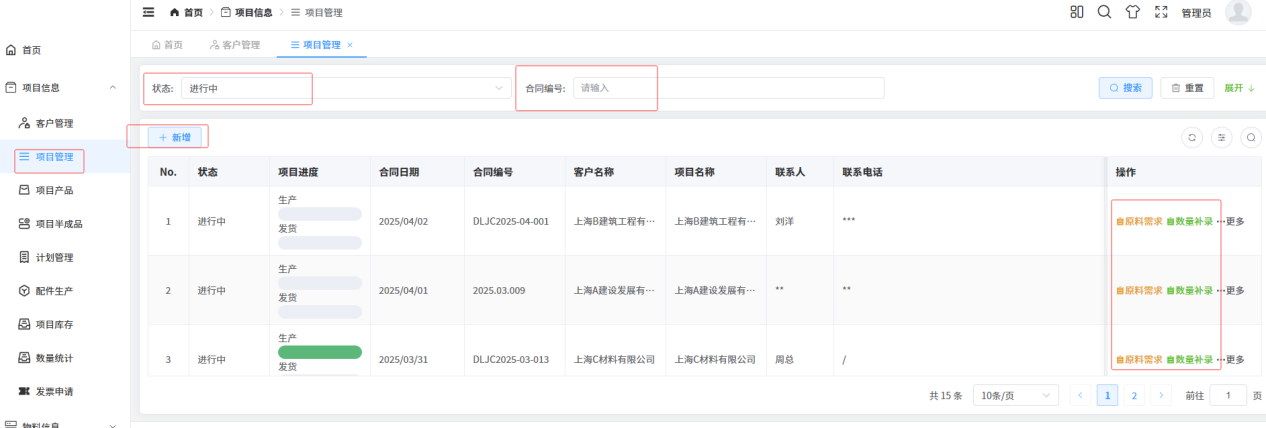
Project list: status, dual progress bars for production and shipping, contract number, customer and project names, material demand and quantity backfill
Projects: status, two progress bars, one contract anchor. Frequent actions (material demand, quantity backfill) sit in the row; rare ones hide behind “more”.
Status
In progress / closed. It decides whether the plan can still be edited, not just the colour of a chip.
Progress
Two bars, one for production and one for shipping. When they diverge, delivery is at risk: output is done but nothing has left the yard.
Contract no.
Numbers like DLJC2025-04-001. A customer signs several contracts a year; only the number is unique, the customer name is not.
Customer / project
Customer is the party, project is this particular order. Kept apart so two jobs for one customer never merge into one ledger.
Contact
The site contact, often not the signatory. Shipping and exceptions go through this person.
Material demand
Which materials this job will consume and how much. It caps every later material issue.
Quantity backfill
Output that exists but was never entered. Backfilling keeps a timestamp — producing before planning is normal, but it must stay visible.
More
Edit, delete, copy behind a second level. Fewer mis-clicks, and fewer deleted projects.

Why “quantity backfill” deserves to be a first-class feature rather than a patch: on a custom line the panel is often already cut and drilled before the plan reaches the system. The system cannot assume plan-then-produce; it can only guarantee that the backfilled row shows when and by whom it was added. Get that right and every report downstream becomes credible.

Two-Tier BOM

Products and semi-finished goods: why two tiers of recipe

A project finally delivers a product (a panel type, measured in m²), but the floor first makes a semi-finished panel (routed, not yet drilled or dispensed). The recipes differ: the product recipe decides how much semi-finished stock and how many accessories the job consumes; the semi-finished recipe decides how much raw panel to cut. Merge them into one tier and material issue either double-deducts or misses.

Project product
The deliverable. Measured in m², its recipe lists semi-finished items and accessories; editable after creation, with history.
Semi-finished
The intermediate state, measured in m² or pieces. Its recipe drives cutting; after routing and dispensing it enters project stock.
Machined parts
Outsourced or in-house process parts with their own table and their own recipe — so they are not bought in as raw material by mistake.
Accessories
Standard parts counted in pieces, issued alongside the product recipe. Separate from raw material because sourcing and pricing differ.

Those four tables form the material foundation that every issue, stock figure and cost draws from. One duplicated material name and every report drifts — which is why we spent two full days cleaning master data before go-live, merging “panel 2.1”, “panel 2.1mm” and “panel-2.1” into one record.
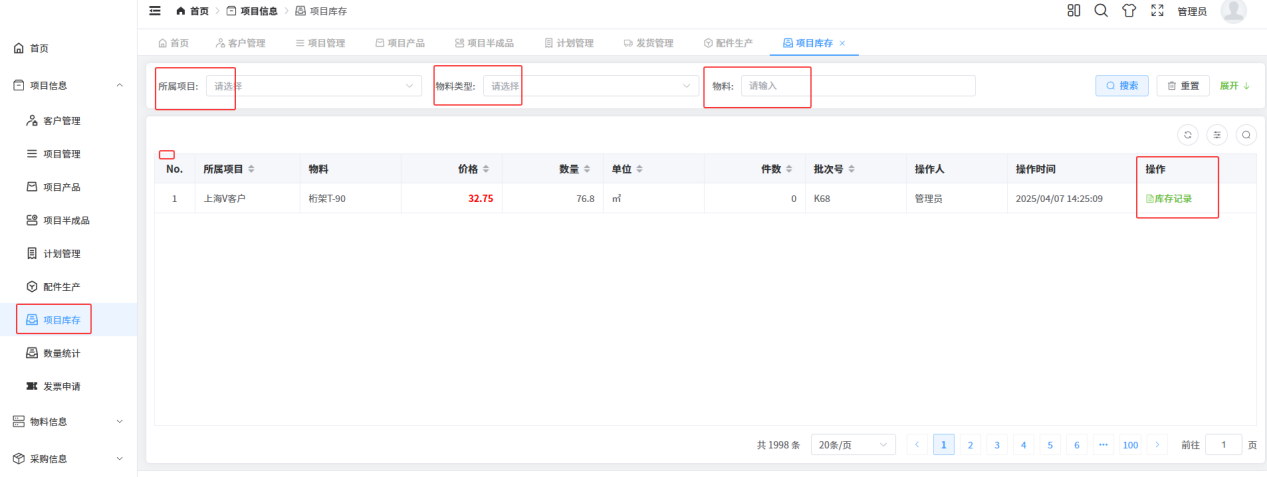
Project stock: project, material, price, quantity, unit, pieces, batch, operator and stock-record entry
Project stock: held by project, not by warehouse. One material may sit in several batches under one project, at different prices and operators; “stock records” drills into every movement.

One design decision is easy to miss: project stock and warehouse stock are two ledgers. Warehouse stock answers “how much material does the company hold”; project stock answers “how much has this job already claimed”. Material issue is the only bridge — without an issue document the material is still in the warehouse, and the job has no cost.

Planning

A plan is not a table; it is a pile of bulk actions

Custom planning has three traits: many rows, frequent change, and truck-load grouping. So the point of this screen is not “add a row” — it is the row of bulk buttons and the nine filters. A factory that re-plans three times a day cannot survive on single-row clicks.
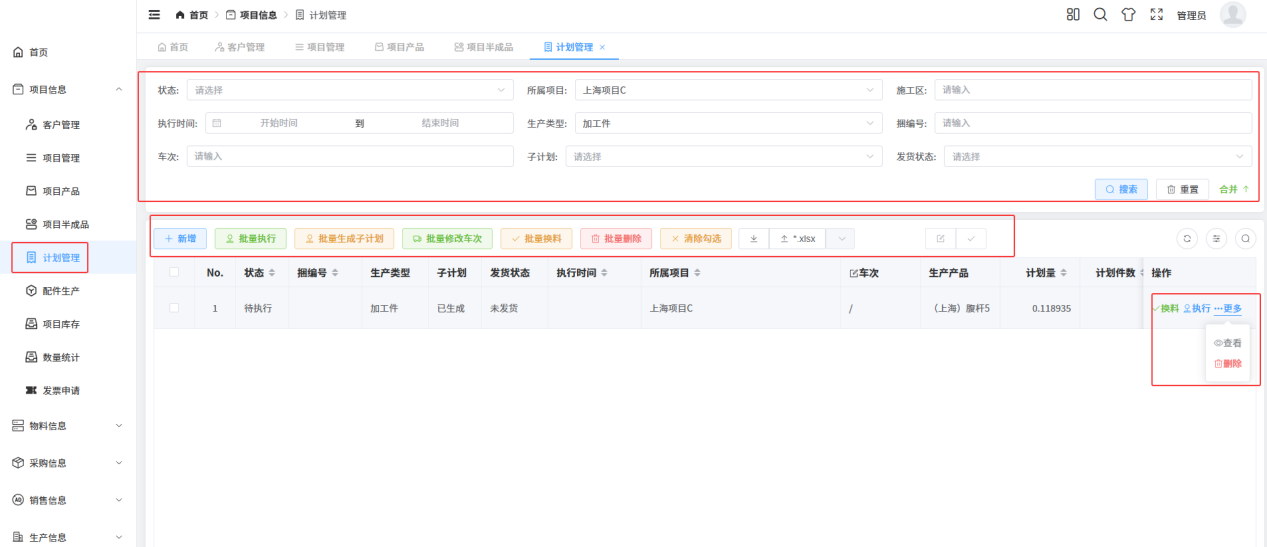
Planning list: status, box number, production type, sub-plan, shipping status, execution time, project, truck, product, planned quantity and pieces
Planning: more filters than columns. Project, work area, production type, box number, truck, sub-plan, shipping status, execution window, status — nine conditions combined to fish tomorrow's truck load out of ten thousand rows.
Sub-plan
A split. One batch is made in several runs; a sub-plan inherits material demand but carries its own truck and due date.
Truck
The loading batch. Everything on one truck should be complete together; reassigning moves goods between trucks, an order of magnitude faster in bulk.
Box number
The physical box. Loading and customer counting rely on it; when plan and reality disagree, check the box first.
Production type
Machined part or in-house. Different routing, and it decides which recipe the issue deducts.
Planned qty / pieces
One in m², one in pieces. Both are needed: the floor dispatches by piece, the customer accepts by area.
Shipping status
Not shipped / partial / shipped. Shipped before the plan completes is exactly how negative stock appears in reports.
Bulk issue
Deduct project stock by planned quantity times recipe, so the floor stops issuing by feel and backfilling at month end.
Exclude selection
Select all, then drop a few rows. A small feature that planners use more than any other button.

Material Chain

Requisition, purchase, receipt, issue: four documents in one chain

Demand starts as a requisition, purchasing turns it into a purchase order, the goods are weighed in as a receipt, and the machining plan issues from warehouse stock. The four are separate for a plain reason: the person who asks does not spend, the person who spends does not hold stock, the person who holds stock does not keep the books. One document needing three signatures ends up with nobody accountable.
01 Floor raisesRequisitionSeveral materials per document, each with quantity and required date; once marked purchased it passes to buying.
02 Buyer actsPurchase orderBatch, supplier, unit price, received quantity; deposits, warehouse-slip printing and forced receipt.
03 Weigh inGoods receiptBooked at the actual weighed quantity; the price sticks to the batch, so rises and falls stay traceable.
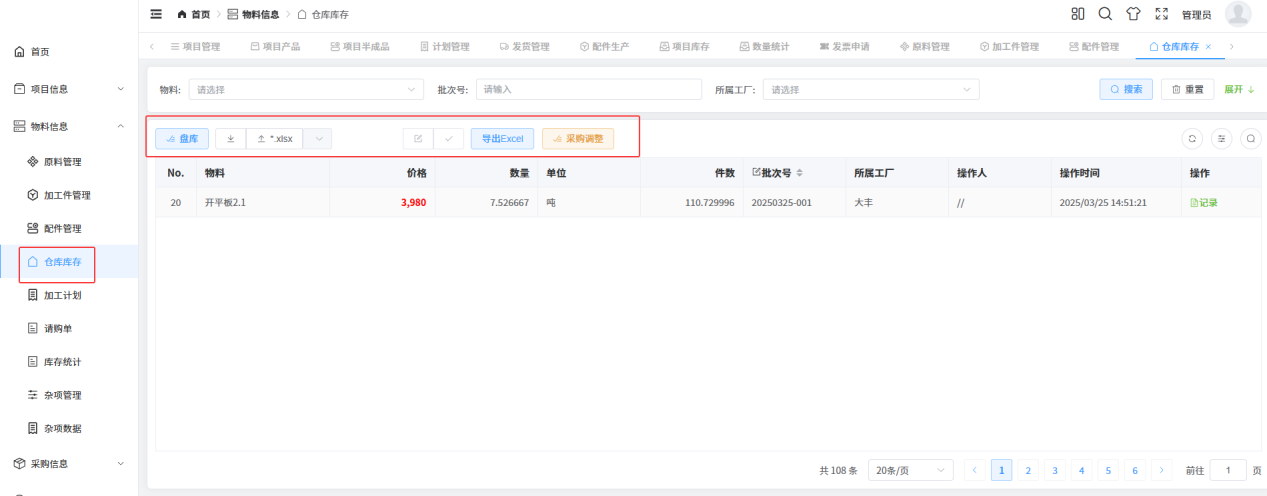
04 LedgerWarehouse stockRows by material, batch and plant; stocktake, import and purchase adjustment all live here.
05 IssueMachining planIssue by recipe, deduct project stock, reduce warehouse stock — where the two ledgers meet.
Warehouse stock: material, price, quantity, unit, pieces, batch, plant, operator and timestamp
Warehouse stock: one row is one batch. The same material at different batches may carry different prices, so stock is never merged; stocktake, xlsx import, export and purchase adjustment sit top right.
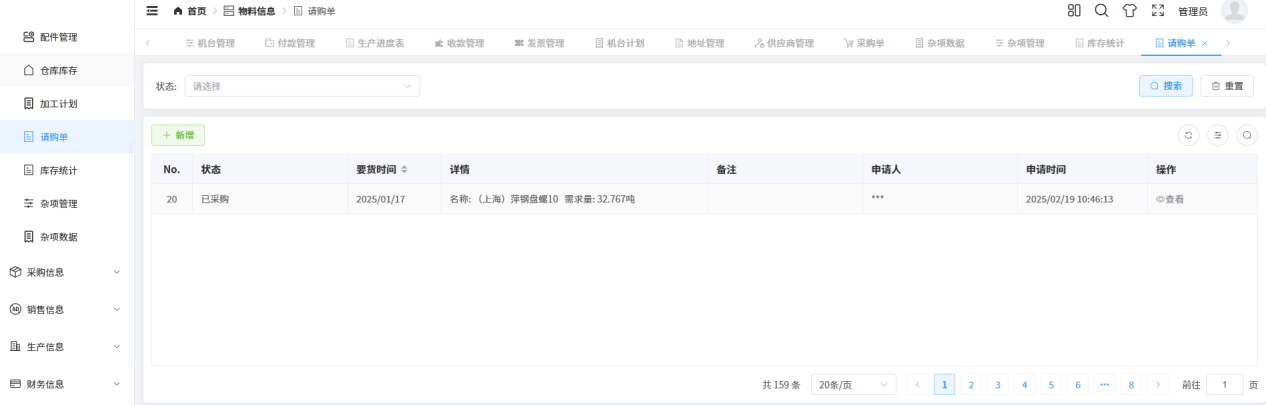
Purchase requisition: status, required date, material names and quantities, requester, request time
Requisition: several materials in one record. The detail line carries name and quantity (for example how many tonnes of a panel), and purchasing may split it into several orders arriving separately.
Price
Per batch, e.g. 3,980 CNY per tonne. Price is a batch attribute, not a material attribute — this month's panel is not last month's price.
Quantity / unit
Tonnes. One material may have several units; conversion is fixed at entry together with its basis.
Pieces
The tonne-to-piece conversion. Loading and stocktaking read pieces, finance reads tonnes.
Batch
Both quality and price traceability depend on it; a complaint can be traced back to which batch and what it cost.
Plant
With several plants or warehouses, location is mandatory — otherwise “we have stock” is an illusion.
Operator / time
Stocktake differences and purchase adjustments must name a person. Not distrust — a difference needs an explanation.

A stocktake does not change a number; it records a difference: counted, booked, delta, and who counted. The same holds for purchase adjustment — a wrong price must be fixable, but the fix must leave a trace, otherwise next month's cost report has no defence.

Units & Reconciliation

Tonnes, pieces, square metres: change the unit, not the books

One batch changes unit three times: purchased by tonne, received by piece, delivered by m². Get a conversion wrong and the books never reconcile. The approach is dull but effective: each step recognises only its own unit, conversion happens at the moment of the action, and the conversion basis (pieces, unit price, area) is stored with it.

Raw material intonneweighed, priced per batch
→cutting
Cut / levelledpiecesheets and pieces for loading
→drill / route
Semi / finishedm²area, into project stock
→inspect / ship
Ship / settlem²same basis as the contract

Five measures that must converge into one identity

The production progress report is the most ledger-like table in the system: one row per project, five measures across, totals at the bottom. Its value is not looks but that any row, and the total row, satisfies the same identity.

Contracted area363,497.76− Shipped151,308.44− Finished stock13,155.08− Semi-finished6,719.64= Unproduced (total row)192,314.60 m²
Shanghai A · contracted16,000− shipped14,003.34− finished765.70= unproduced1,230.96 m²
Nanjing A · contracted49,457− shipped51,328.72− finished (negative)−2,795.43= unproduced923.71 m²

All three hold, including the negative stock. Figures from the manual's demo environment; totals and rows are both in m².

A negative number is not an arithmetic error; it means more was shipped than the warehouse held. Either an over-shipment, or last batch's finished goods were never booked in. On a report, a negative is a red flag for the planner, not a mistake for the accountant. Only a report whose negatives can be read is a report worth meeting over.
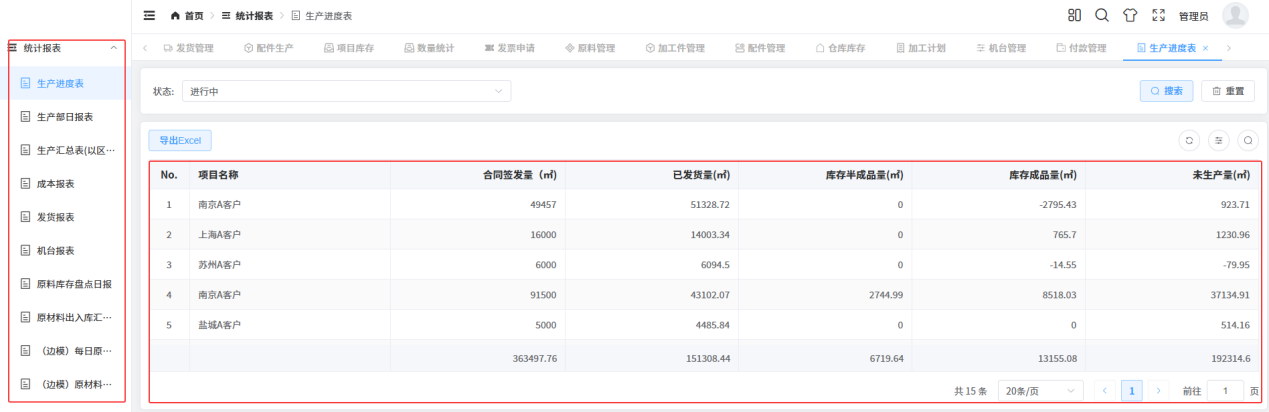
Production progress report: project, contracted area, shipped, semi-finished stock, finished stock and unproduced area, with a total row
Production progress: five measures, one total. Finance takes contract value, sales takes shipped area, the floor takes unproduced area — three departments reading different columns of the same table, and finally one definition.

Machines

Capacity is not “roughly how much”; it is per machine, per day

Drilling, routing and dispensing are different machines with different cycle times, yields and changeover costs. A plan therefore has to land on a machine: how much this machine is scheduled for this month, how much this shift produced today. Land it on a machine and you can schedule; land it on a workshop and you are guessing.
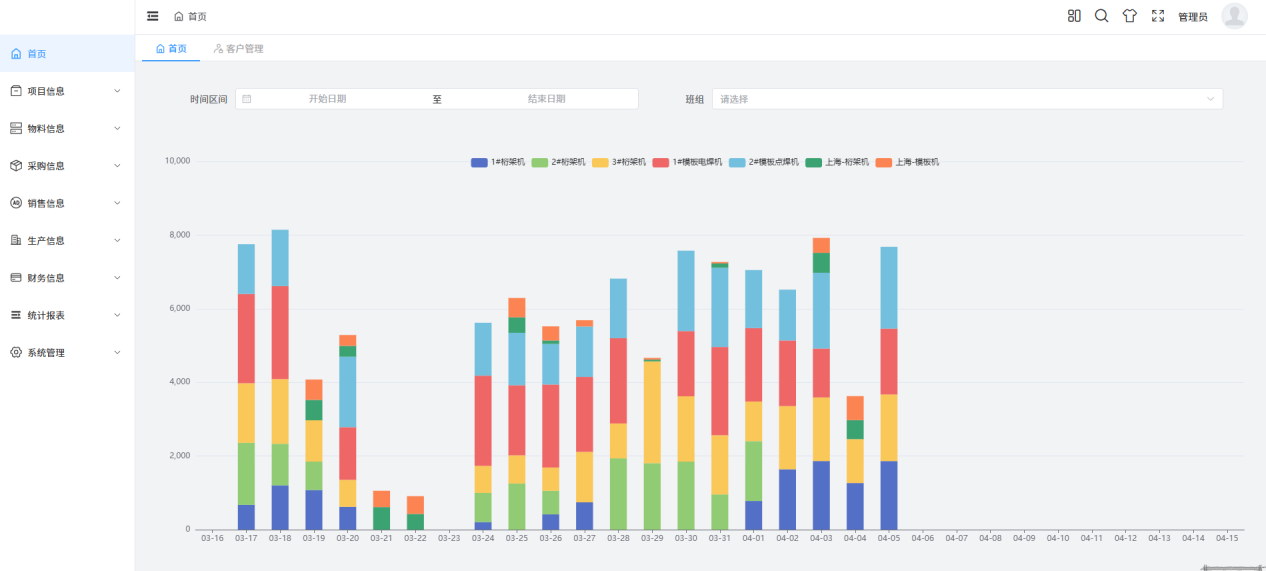
Home dashboard: stacked bar chart of output by date and shift, colours for each drilling, routing and dispensing machine
Home: one chart the plant manager reads for thirty seconds each morning. Dates across, output up to 10,000, one colour per machine. When a segment disappears, nobody needs to ask — the machine schedule shows whether it stopped.
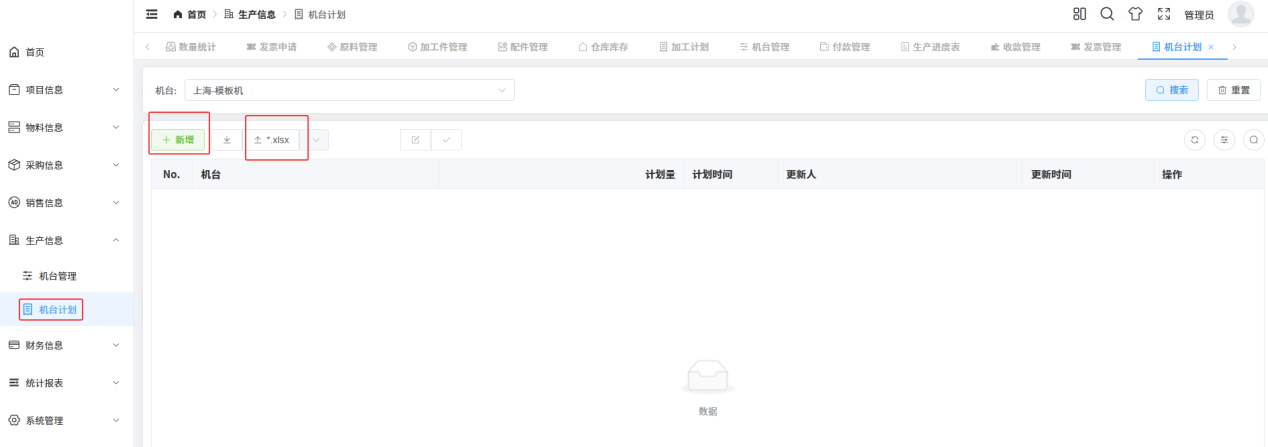
Machine schedule: machine filter, new and xlsx import, machine, planned quantity, planned date, updated by and updated at
Machine schedule: machine + planned quantity + planned date. xlsx import exists because schedules are already built in Excel; new and import sit side by side at top left.
Machine master
Name, type, plant. Drilling machines numbered 1#–4#, routing and dispensing numbered separately; two “Shanghai machines” in one plant must stay distinguishable.
Machine schedule
Planned quantity and date, importable, with updater and timestamp — you can see who moved the schedule.
Machine report
Actual output per machine against the plan, giving load and attainment.
Shift dimension
The home chart filters by shift; on the same machine two shifts can differ by thirty percent.

The machine dimension has a hidden job: it cross-checks the project report. If a project claims production is finished and the machine report cannot find the output, the report was probably booked against the wrong project — an error that is invisible in the project view and obvious in the machine view.

Roles

One shipment, five people, five different truths

The hard part is not the number of features; it is letting each person see only what they need and change only what they own. This table was agreed with the client during go-live: what each role looks at first every morning, where it lives, and which column they may edit.

RoleFirst look every morningWhere it livesMay only change
Salesthe two progress bars (production, shipping), due datesProjects, shippingcontract data, shipping notes, addresses
Plannerpending plans, truck completeness, unproduced areaPlanning, machining plan, machine scheduleplanned quantity, truck, sub-plan split
Warehousepending receipts, stock differences, requisitionsWarehouse stock, requisitions, purchase ordersreceived quantity, stocktake delta, purchase adjustment
Shop floortoday's planned quantity on this machineMachine schedule, machining planreported output, material issue
Financeshipped not invoiced, invoiced not receivedInvoices, receivables / payablesissue, void, record receipt, offset advances

Permission is not “can you open this menu” but “can you change this column”. On the same project, sales may edit the contract number and the planner may not; the planner may move a truck and the warehouse may not; the warehouse may adjust a stocktake delta and finance may not. Column-level rights are more work than menu-level rights, and they prevent ninety percent of the arguments.

Delivery & FAQ

The five questions every go-live raises

Production systems rarely fail for lack of features; they fail because three months later everyone is back in Excel. These five questions come up at every custom factory, from the plant manager and from IT.

Q1We already run on Excel. Why a system?
Excel is not wrong as a grid; it is wrong because one data set gets copied into four. A system solves exactly one thing: four departments editing the same row. So the first step is not training but importing the spreadsheets (plans and stock both accept xlsx), letting the system feel as easy as Excel before talking about process.
Q2The plan changes three times a day. Can it keep up?
Yes, as long as you do not turn the system into an approval flow. The answer is bulk action: select all, reassign trucks, generate sub-plans, issue material — effective immediately; only irreversible actions (delete, issue) are logged and double-confirmed. Fast-changing factories need fast edits, not fast approvals.
Q3Can stock be real-time?
It can be action-level real time: receipt, issue, stocktake and adjustment each update the number immediately. But which corner of the workshop a panel sits in is unknown, and the system should not pretend otherwise — hence project stock and warehouse stock stay separate, bridged by the issue document.
Q4How many materials can one requisition carry?
Several, each with its own quantity and required date. Purchasing may split it into multiple orders arriving separately, with different batches and prices. Split arrivals are the benefit; someone tracking completeness is the cost — usually the planner.
Q5Can reports be sliced by customer, project, machine?
Eight reports cover production, cost, stock and in/out movement, drillable by customer, project and machine. A new dimension is a new view, not a rewrite of the business tables — which is exactly why we insisted on defining the metrics first: once the definitions are fixed, reports are just permutations.

MORE CASES

More Related Cases

Non-standard production flow management
EMSProduction management, non-standard automation

Non-standard production flow management

On the same job, sales signs in square metres, purchasing buys in tonnes, the shop floor moves piece...

View Details →
Supplier delivery management system
EMSDelivery management, order system

Supplier delivery management system

A supplier delivery management system: prices customised per customer group, with different customer...

View Details →

Cross-border apparel supply-chain collaboration platform
EMSCross-border e-commerce, supply chain system

Cross-border apparel supply-chain collaboration platform

A supply-chain service provider for cross-border apparel sellers: shops live on Amazon and other ove...

View Details →

View All Cases →

Planning a similar production line or enterprise system?

Start with our pricing logic, then let's talk requirements — cost structure, technology comparison and acceptance criteria, all laid out in the open.