
Industrial smart manufacturing app
Leave, overtime, gate entry, shift handover, patrol inspection, incoming inspection, material issue,...
View Details →Three Gaps
The problem with paper is not the paper. It is that time and place stop matching. Inspection finishes at 09:12 and is written up at 19:20. A leave form needs three signatures, and one of the three is out of town. At month end a clerk retypes a pile of forms into Excel, mistypes one number, and the whole month's cost is off. Three lags stacked together turn the shop floor into a memory exercise.
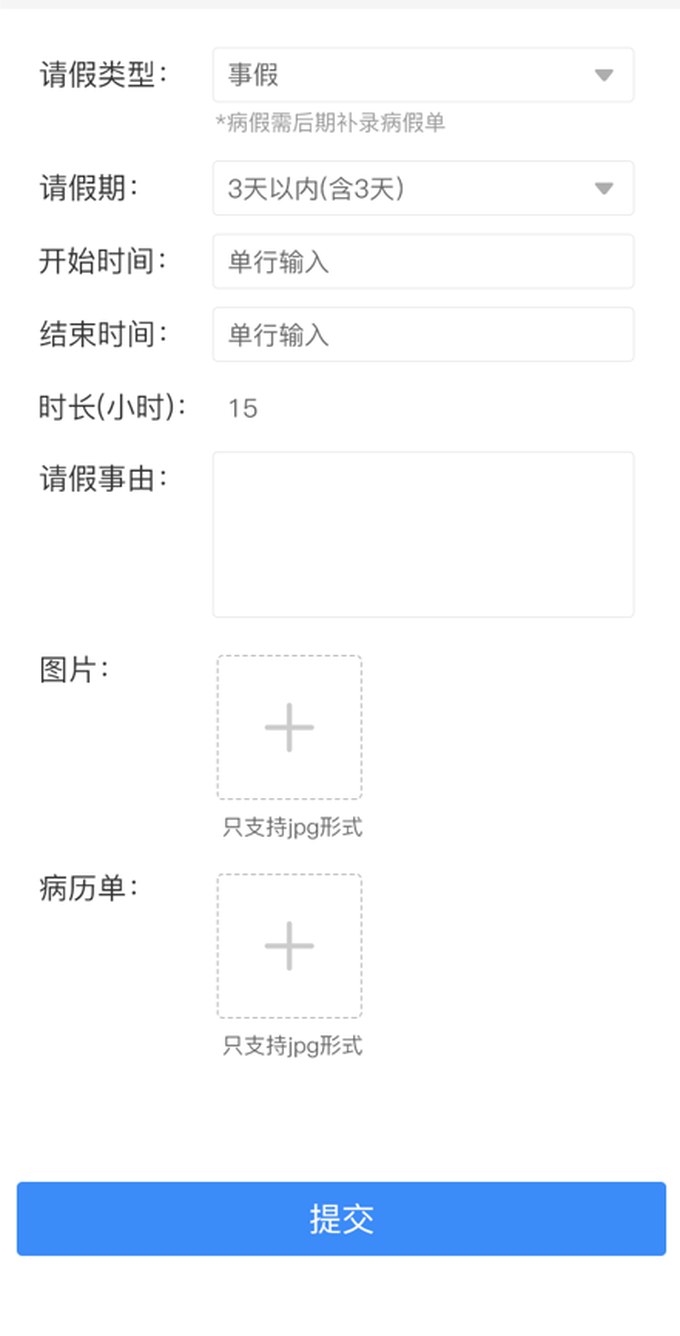
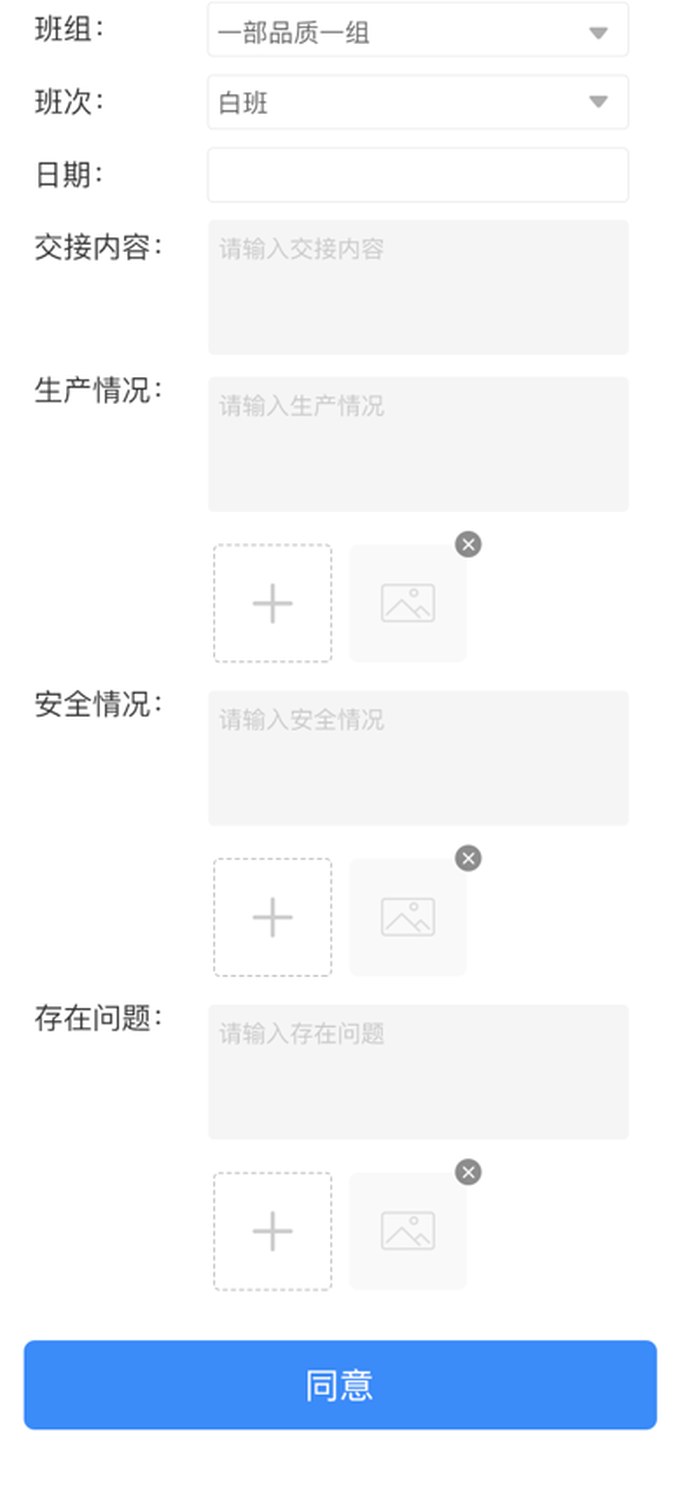

The usual mistake is shrinking the PC table until it fits a phone — which only moves the after-hours data entry onto a different device. This app makes the opposite trade: fields follow the order of the work, anything pickable is a dropdown, line items become cards, and photos hang off the record. The goal is not "it can be filled in on a phone", it is "it can be finished next to the machine".
Three Tabs
The whole app has three first-level entries: Messages, Office, Me. That is not an arbitrary navigation choice; it is three time scales. Messages is what has already happened, Office is what is happening now, Me is what has accumulated. Almost every action in a shift can be filed under one of those three words.
The split has a hidden benefit: training takes three sentences. "To do something, go to Office. To see a result, go to Messages. To look something up, go to Me." The shorter the explanation, the longer a shop floor keeps using it.
Function Map
The feature list is organised by department, so it looks like five systems. Organised by who is acting on what, there are only five: person on company (leave, onboarding, resignation, transfer, overtime), person on gate, vehicle and shift (site entry, handover, vehicle request, general approval, shuttle statistics), person on material (five inspections), material on location (receipt, issue, transfer), and time on person (clock-in, approval, messages).
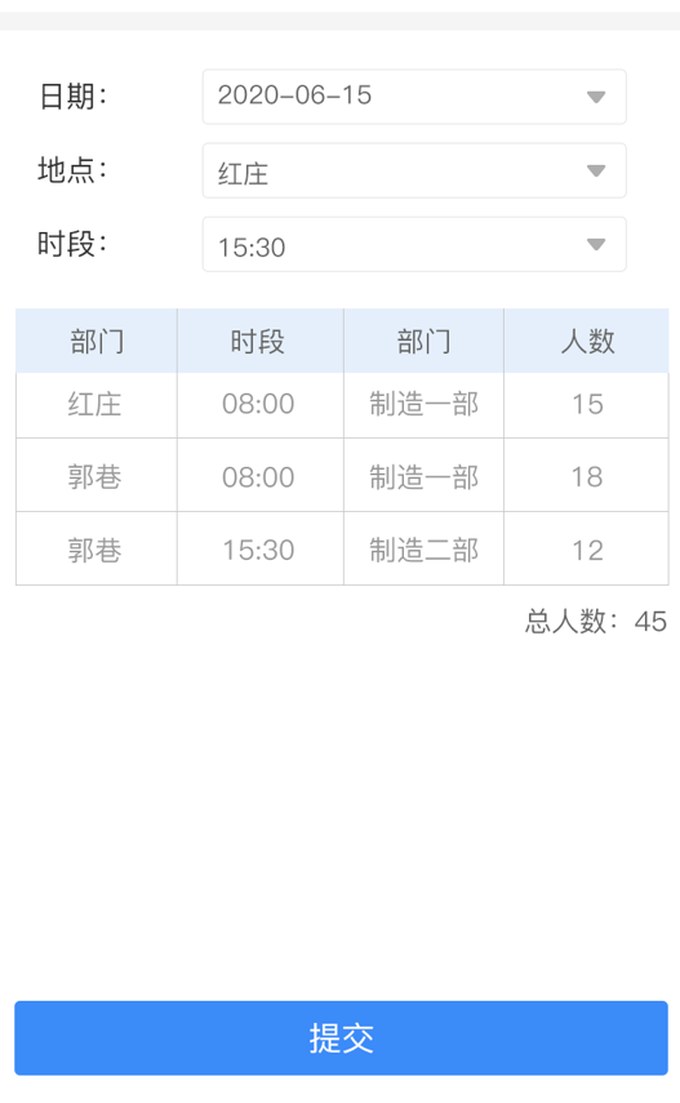
The manual's feature list also names production plan, daily production report, daily cost report and safety team as part of the same app. This case does not cover them: it only walks through the eighteen forms whose fields are visible in the screenshots. A case study earns trust from the fields you can see, not from the length of the menu.
Anatomy
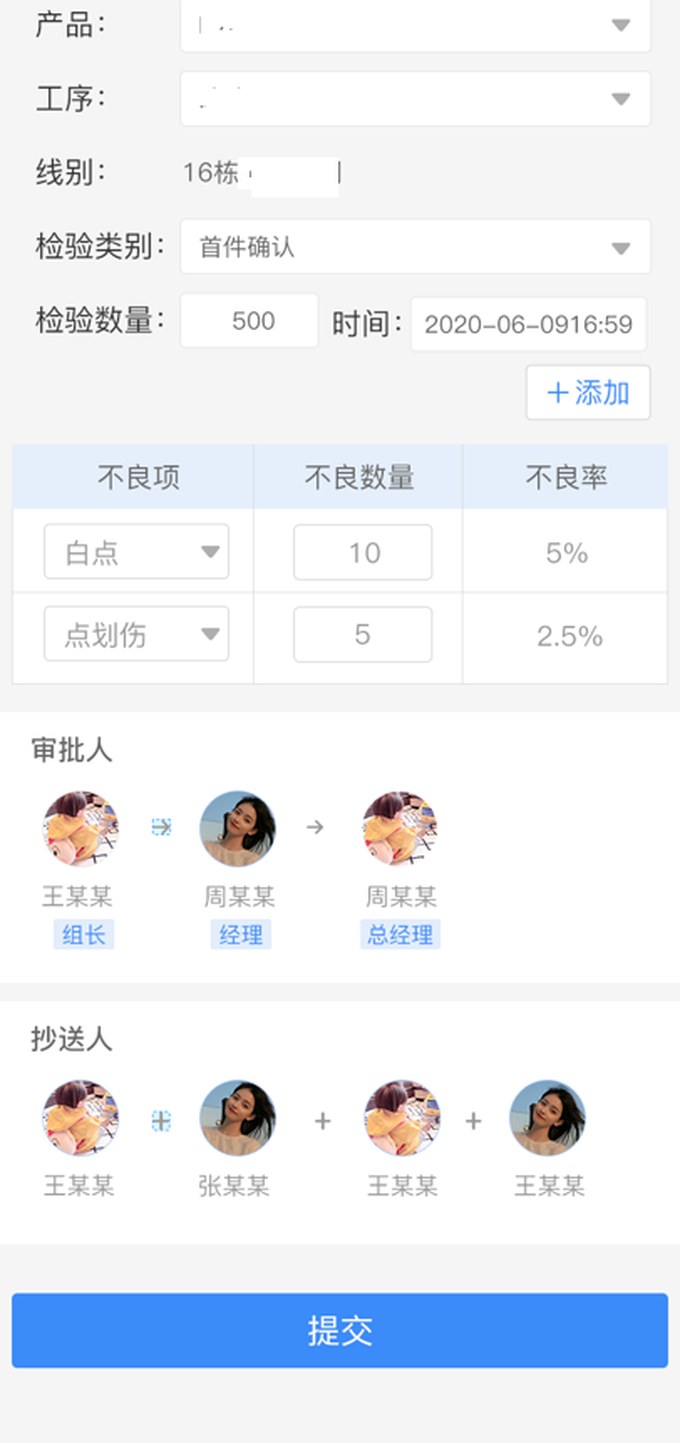
Eighteen forms look alike on purpose. Learn one and you have learned all of them: say who you are (subject), say how many things this involves (lines), take a photo if there is something to see (evidence), send it to whoever signs (approval), tell whoever needs to know (CC). Every form is a different arrangement of those five parts.
Five Checks
Quality is where "unify everything" does the most damage. Incoming inspection judges a supplier's batch. Patrol judges a process on your own line. Delivery inspection judges the box in the customer's hands. The lab judges the chemistry in a bath. Different objects, different frequency, different judgement — force them into one form and every field ends up saying "depends".
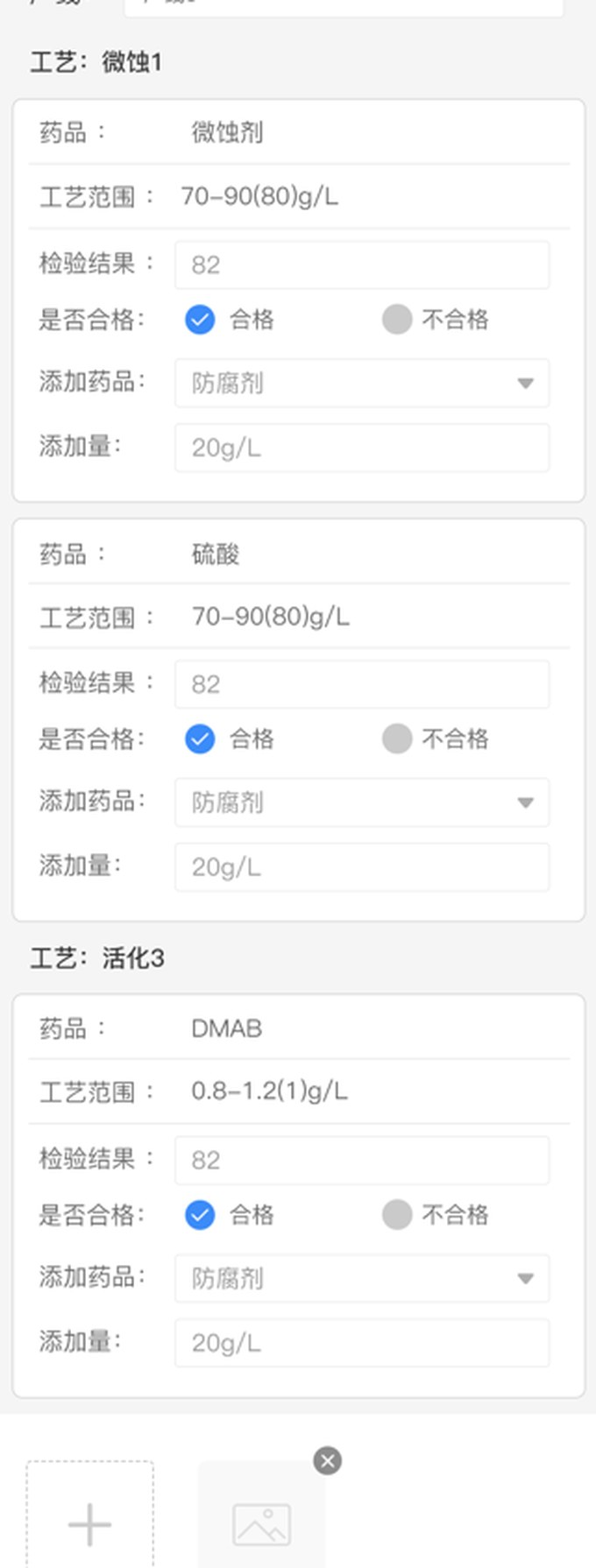
The lab form shows best how a judgement should be designed. The operator does not enter "pass", they enter a number: the process range is 70–90 (80) g/L, the measurement is 82, and the system judges it acceptable. A second block records "chemical added and how much", keeping the correction on the same record as the reading.
When a bath drifts, that one record answers three questions: what was measured, was it in range, what was added and how much. A form that only records pass/fail records nothing.
One process may involve three or four chemicals (etchant, sulphuric acid, DMAB), each with its own range. The form becomes "one card per chemical" and adding a dose is one tap — the structure follows the process, not the spreadsheet.
Evidence
Text can say "slightly scratched". It cannot say how many, how long, or on which face. The photo is the useful part of an inspection record: packaging and label for incoming goods, product and carton for delivery, equipment and bench for a handover. So the camera is a first-class part of the form, not a fallback "upload attachment" button.
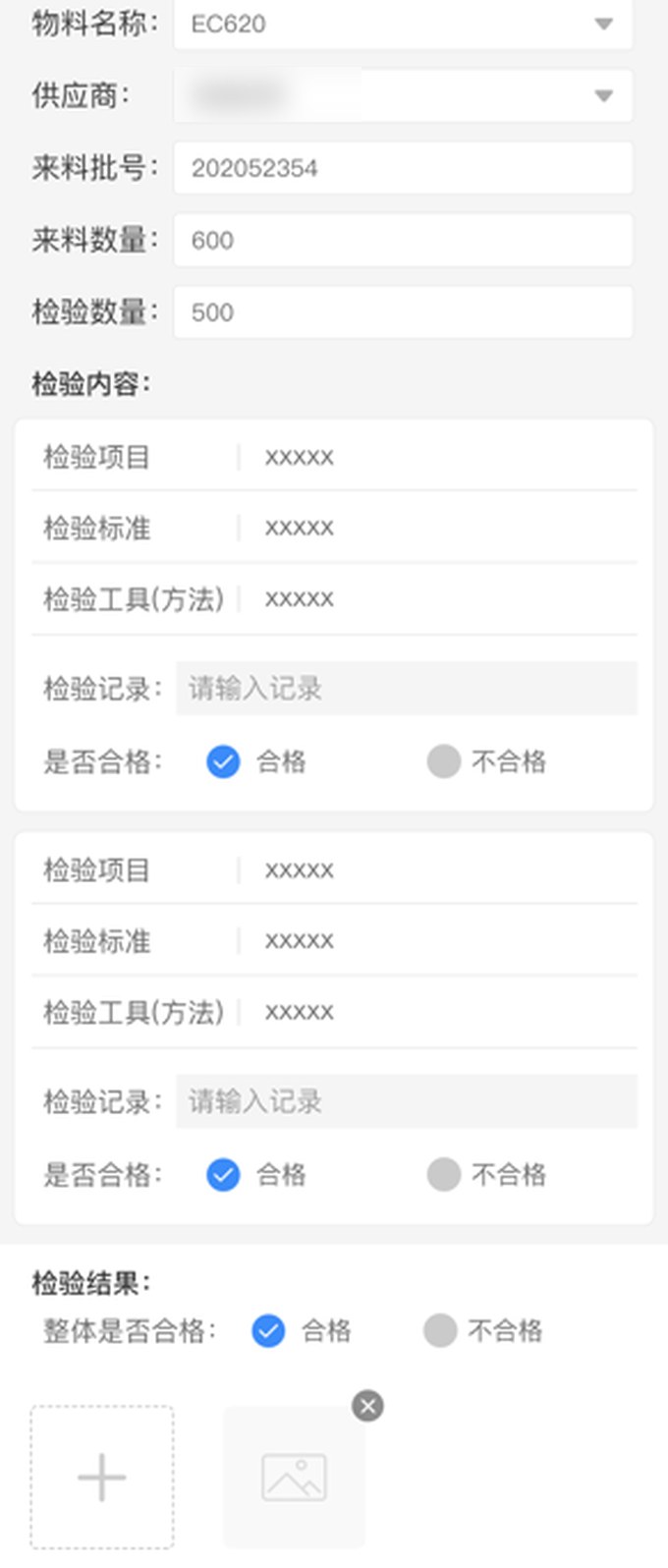
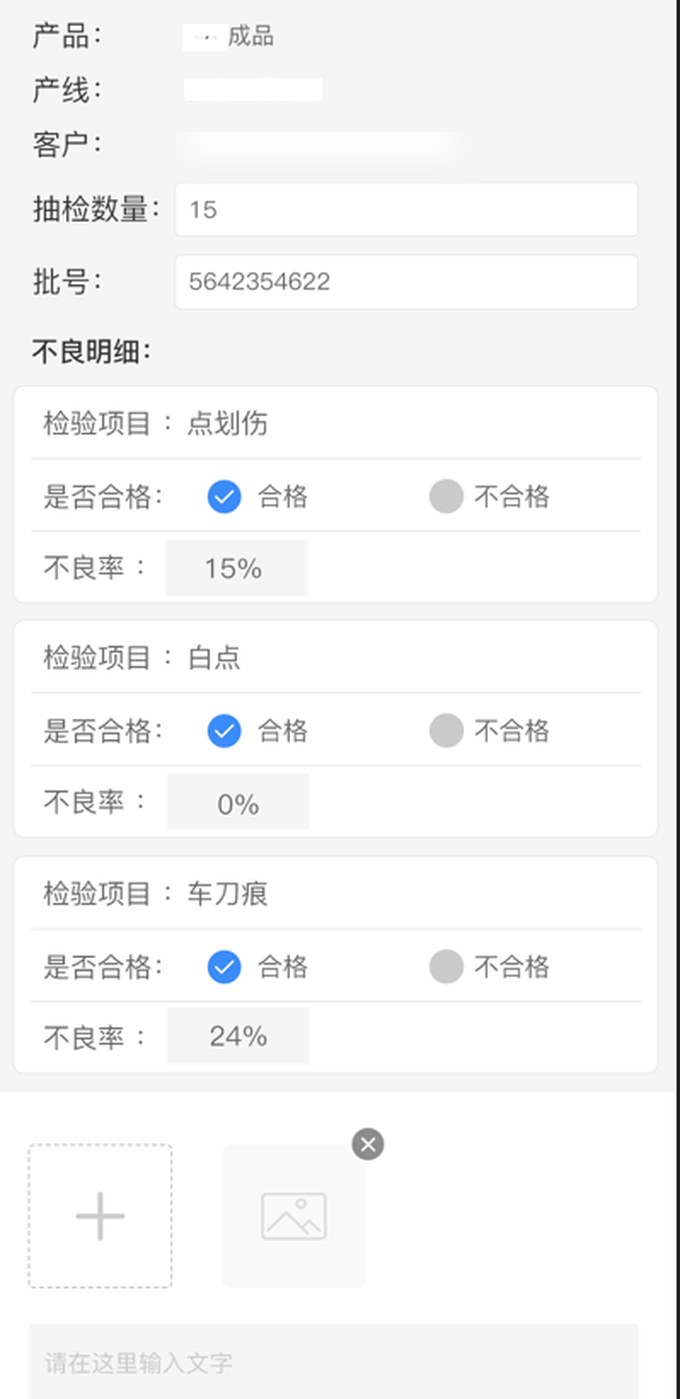
A phone screen is narrow, so line items cannot be laid out sideways. The answer is one card per defect: the card holds three fields — item, pass or fail, rate. Five defects means five stacked cards and a thumb scroll, which beats dragging a table left and right. This is the biggest design divergence from the PC: the desktop optimises for seeing everything at once, the phone for finishing the entry.
Approval
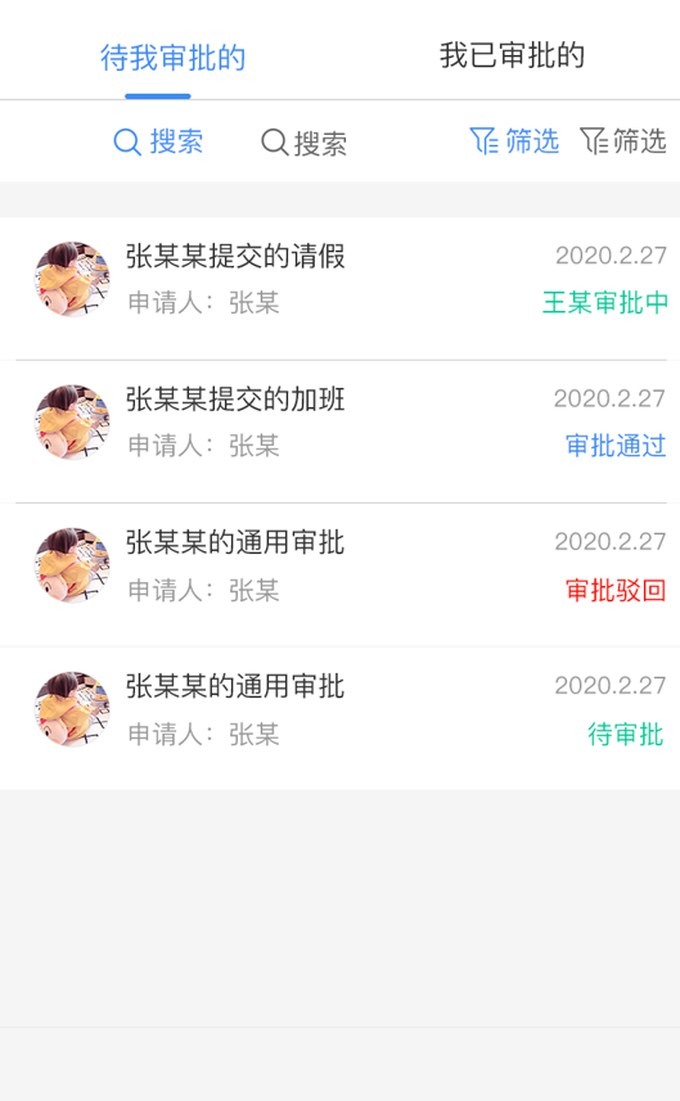
Approving on a phone fails for two reasons: you cannot find what is waiting for you, and you cannot tell where your own request went. So "Me" holds exactly three views: waiting for me, approved by me, and the ones I started or was copied on. A form goes from submitted to closed in at most three taps.
Four records, four states — that is the entire vocabulary of the chain: in progress (someone else's turn), approved (carry on), rejected (back to the submitter, reason required), pending (nobody has touched it).
A rejection must carry a reason, and not out of process pedantry. On a shop floor, a form that comes back with no explanation means a phone call, a re-edit and a second rejection. Putting the reason next to the button saves three phone calls.
Separating CC from approval is what makes the chain fast: three people sign, ten people may need to know. Mix them and ten people who carry no responsibility are allowed to slow the clock.
A Day
Put the app inside one team leader's day and it becomes clear what it replaces. Each of the six moments below used to be a paper form, and all six used to be saved up for after the shift. Now each is finished in the minute it happens.
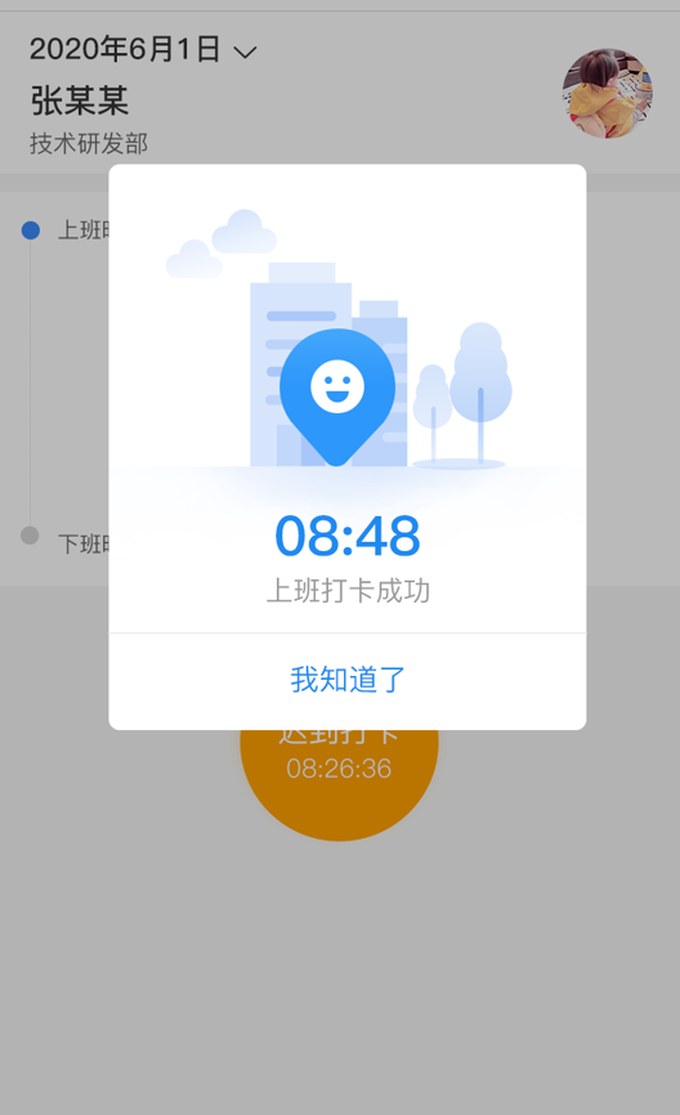
Clock-in deserves a note of its own. Its value is not the location, it is framing the day. With an in and an out, the five records in between finally have an owner: who was on shift, which record belongs to that shift, and which hours count as overtime.
The success card is deliberately plain: 08:48, clock-in successful, location. It needs nothing more, because a worker only cares about two things — did it register, and at what time.
Material Flow
Material movement only needs three documents: in (goods receipt), out to the line (material issue), out of the plant (transfer). They look like three separate segments, but they share two anchors — the batch number and the material line. The batch makes traceability possible; the line makes "how many kinds of goods are on this truck" answerable.
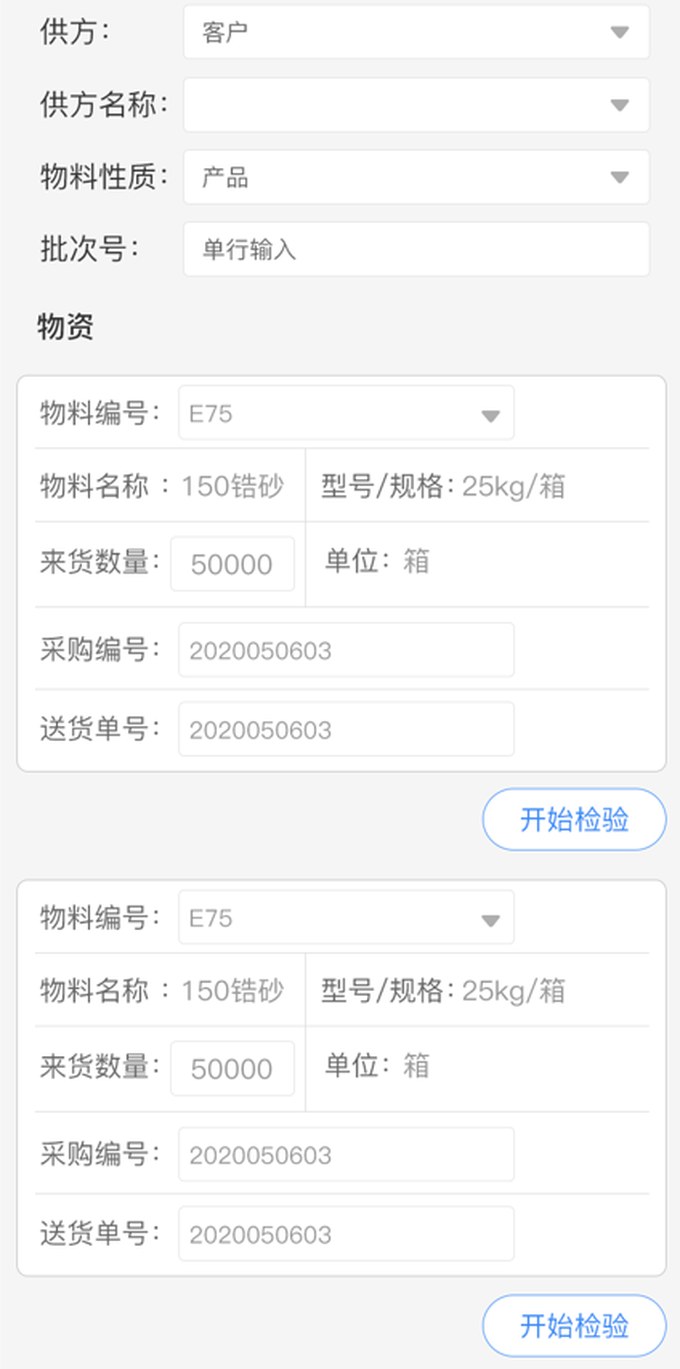
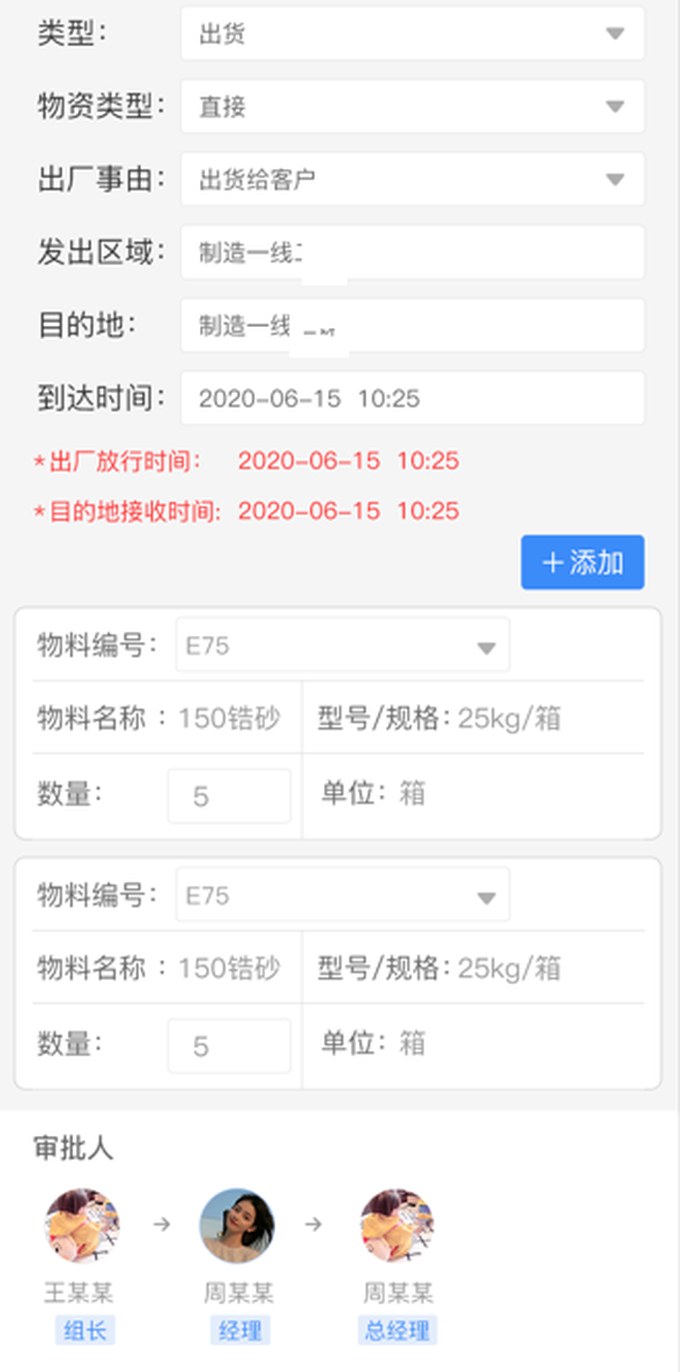
The "start inspection" button at the end of a receipt line is the shortest cross-module path in the app: the storekeeper taps once and the batch, with its number, enters IQC; the verdict comes back onto that batch, and only a pass continues into stock. Material and quality are not two modules, they are two faces of the same action.
Roles
One app, five reasons to open it. Before go-live we worked through this table with the client: what each role looks at first, how many times a day, and what they can actually do on the phone. If the table does not line up, no amount of features will help.
Clock in, leave, overtime, read the verdict. Uses it least — and blocks the project if it does not work.
Handover, first article, approve overtime and leave, and glance at the team's inspection records.
Patrol, incoming, outgoing, lab. Every entry means a photo. The phone is their logbook.
Receipt, issue, transfer. Batch and quantity must be right; one wrong digit breaks traceability.
Two actions only: approve or reject. One inbox, with the detail, the photo and a reason field.
The table also settles one thing: there are no reports on the phone. Trends and exports belong to the PC back office; the phone only carries the action of the moment. Treating a phone as a small computer is the easiest mistake to make in this kind of project.
Delivery & FAQ
Mobile projects rarely fail for lack of features. They fail because the app is installed and nobody opens it. These five questions come up in the first week of every pilot.
MORE CASES
Leave, overtime, gate entry, shift handover, patrol inspection, incoming inspection, material issue,...
View Details →
A mobile service system for EV owners: book an installation by city district and follow it through t...
View Details →
Companion software for a pool-cleaning robot: a PC back office plus Android / iOS apps; devices come...
View Details →Start with our pricing logic, then let's talk requirements — cost structure, technology comparison and acceptance criteria, all laid out in the open.