
Laboratory equipment · Smart reagent terminal
A 15.1-inch touchscreen terminal that folds lab reagent work into 13 modules: log in by card or face...
View Details →Why It Is Hard
A 500 ml bottle of ethanol costs little. But four questions that cannot be answered are a fuse: when was this bottle opened, who took 20 ml and when, how much is left, and is it expired. The traditional answer is a paper log plus a spreadsheet — handwriting at checkout, eyeballing at stocktake, memory for expiry. The more cabinets and people, the less anyone trusts the book.
All screenshots come from a demo environment: the brand area and device markings are blurred and no manufacturer is named; organisation names, people and reagent values are demo data.
The Machine
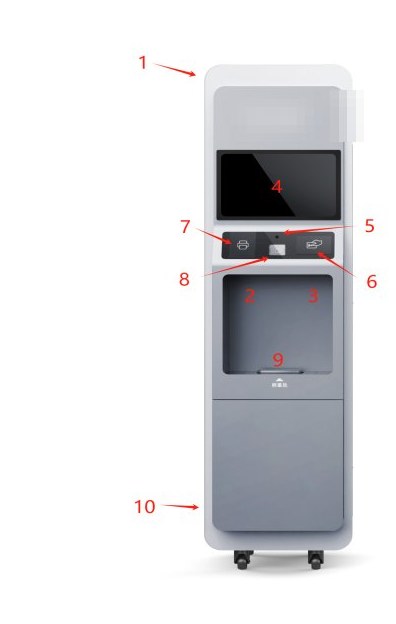
The old routine: open the system on a PC, turn to grab the scanner, turn again to put the bottle on a balance, then walk to another machine for a label. Four turns and a dozen steps per inbound. The terminal puts screen, camera, card reader, scanner, scale and printer into one body: park it beside the cabinet and the operator finishes without moving their feet.
 Device markings blurred
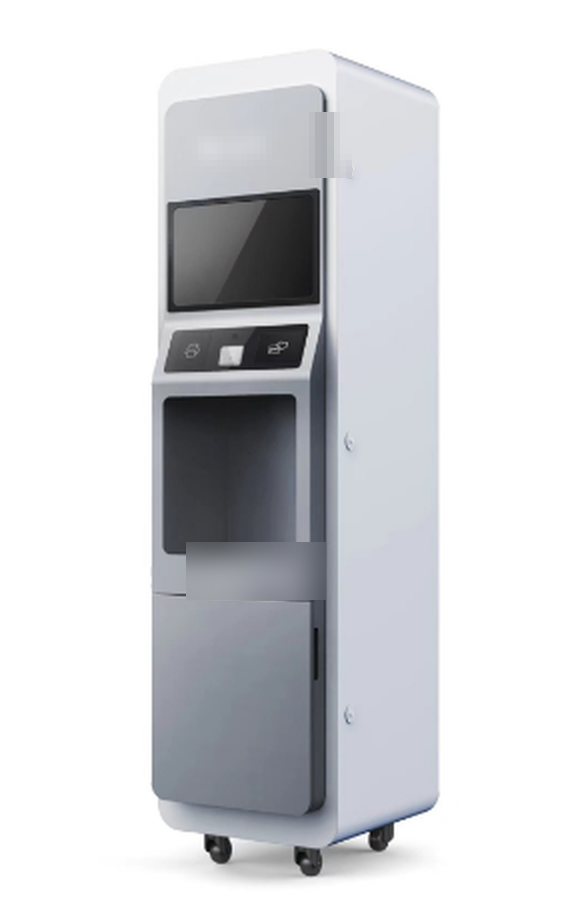
Desktop units sit at the end of a bench; floor-standing units stand on the route through the reagent room. Only the cabinet and the footprint differ — screen, peripherals and software are identical. Start with one desktop unit, prove the workflow, then add floor units without retraining anyone.
| Form factor | Dimensions | Scale range | Screen |
|---|---|---|---|
| Desktop | 480 × 410 × 520 mm | 0–3 kg | 15.10 in |
| Floor-standing | 500 × 623 × 1960 mm | 0–3 kg | 15.10 in |
 Device markings blurred
Topology
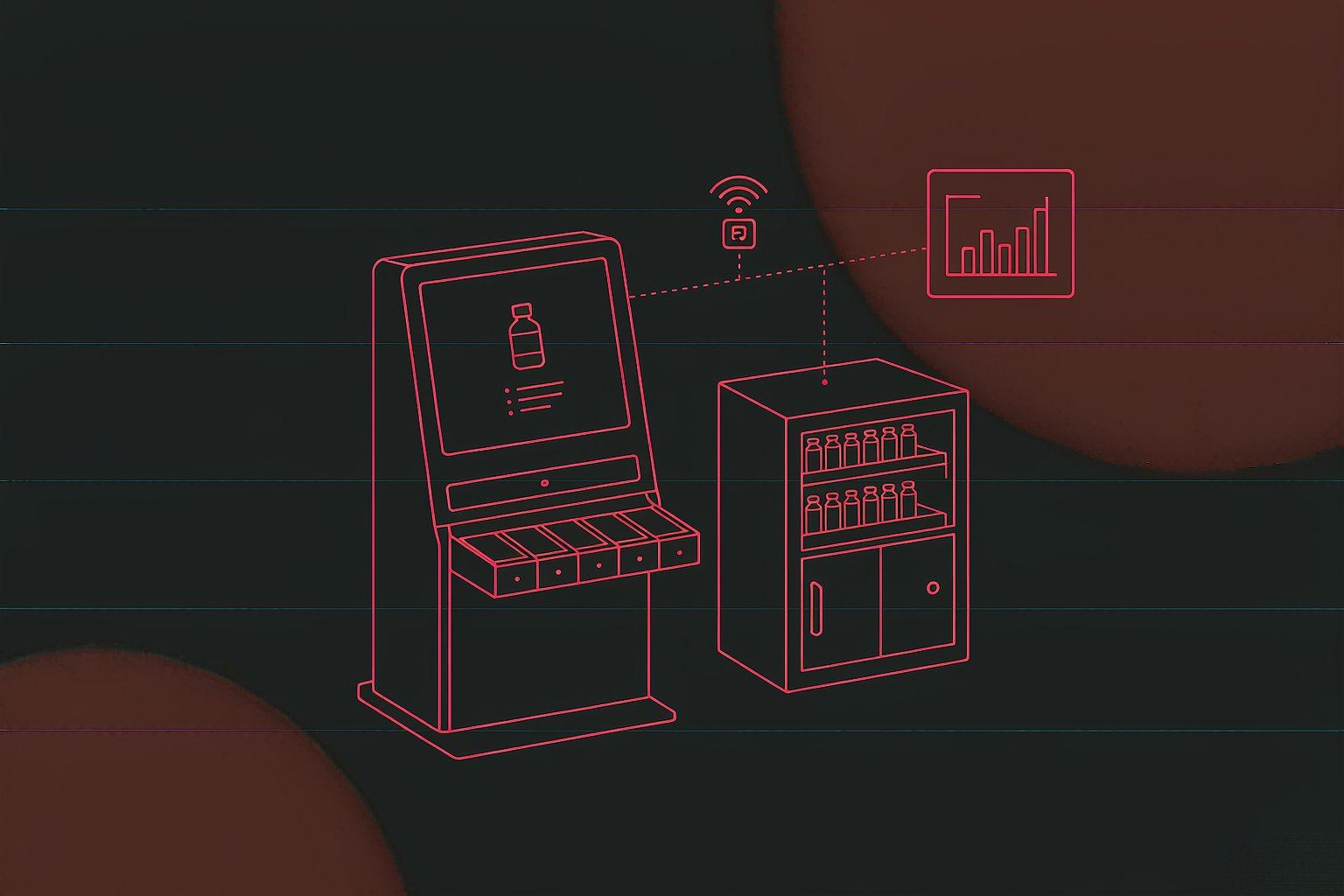
This terminal is not a wrapped web page. It talks to hardware directly: the controller board reads every drawer position, the reader, scale, printer and camera each hold a port; at the same time it reconciles with the platform. Millisecond serial polling on one side, a network that may drop on the other — the two must be designed apart.
The board asks every drawer whether it is closed, one by one; more cabinets means a longer cycle. The value is expressed as “cabinets × 10 seconds”, with a floor of “cabinets × 5 seconds” — below that, the next round is sent before the previous one answers and the serial line jams. Parameters like this must be calculable and verifiable on site.
The board read command is a hex string starting with FA, and board firmware varies by batch. Put it in the config and a board swap is one string, not a new release. Same for the balance: R on older models, W on newer ones.
HTTP 5000 is the port the terminal exposes; WebApi.BaseUrl decides whether it talks to a local service, a server room or a cloud domain. One installer, three deployment shapes, one line of difference.
Two Keys
The first link in the traceability chain is “who”. Login is not a formality: it decides whose name lands on every record that follows. The card is fast, the face resists proxy check-ins; with both present, a broken key never stops the day's work.
When logged out, placing a registered ID card on the reader at the lower left logs in without touching the screen. Five access cards ship with the unit to open configuration and service menus; they must be held by named owners, because the menus themselves are card-gated so nobody wanders into settings.
With a camera index configured and a camera found, standing in front of the screen is enough. Inference runs locally (ViewFaceCore): both the enrolment image and the comparison stay on the machine, biometrics never leave for the cloud.
Walking away? 1200 seconds of inactivity logs out, and the value can be shortened to suit lab policy.
| Parameter | Default | Why this value |
|---|---|---|
| Camera resolution | 1280 × 720 | Higher adds decode load without helping recognition |
| Frame rate | 30 fps | Matches a normal USB camera |
| Detection delay | 50 ms | Leaves room for inference between frames |
| Liveness frames | 50 | Consecutive frames, to reject photos and replays |
| Face crop | 300–500 px | Too small loses features, too large slows matching |
| Cache folder | Faces | Where enrolment images live, relative to install |
| Auto logout | 1200 s | An unattended screen must not stay unlocked |
The on-site fallback: face recognition depends on CPU instruction sets. Four algorithm libraries ship under viewfacecore\win\x64 (default / Haswell / Pentium / Sandy Bridge); when a machine lacks AVX2 and the module will not start, renaming the matching dll to tennis.dll switches it — no new machine, no code change. On device projects, a pre-built escape hatch is worth more than one more feature.
One Code, Four Moves
There are only four business actions: inbound, take, return, dispose. All four orbit one thing — the label on the bottle. The QR code is not a sticker; it is the reagent's identity in the system: created at inbound, read at take, updated at return, retired at disposal.
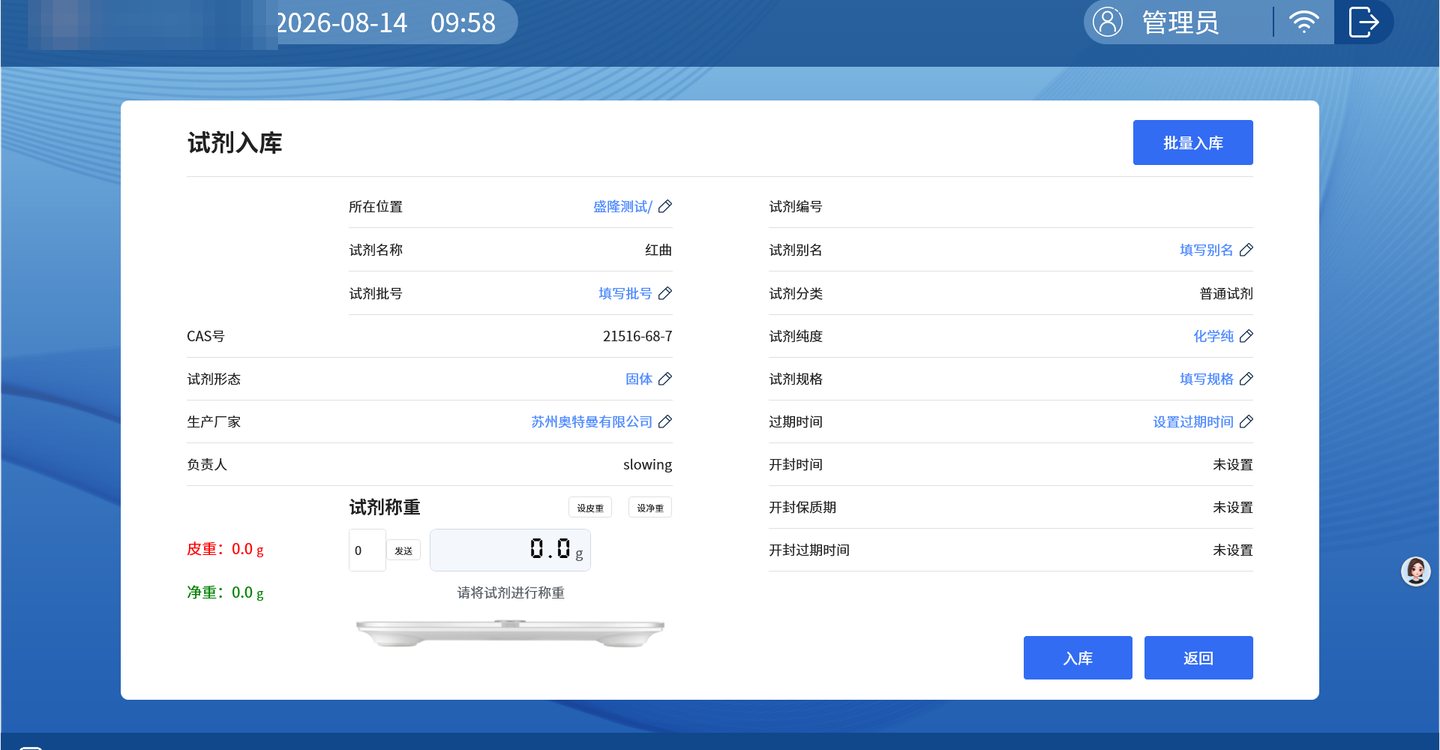
Warehousing
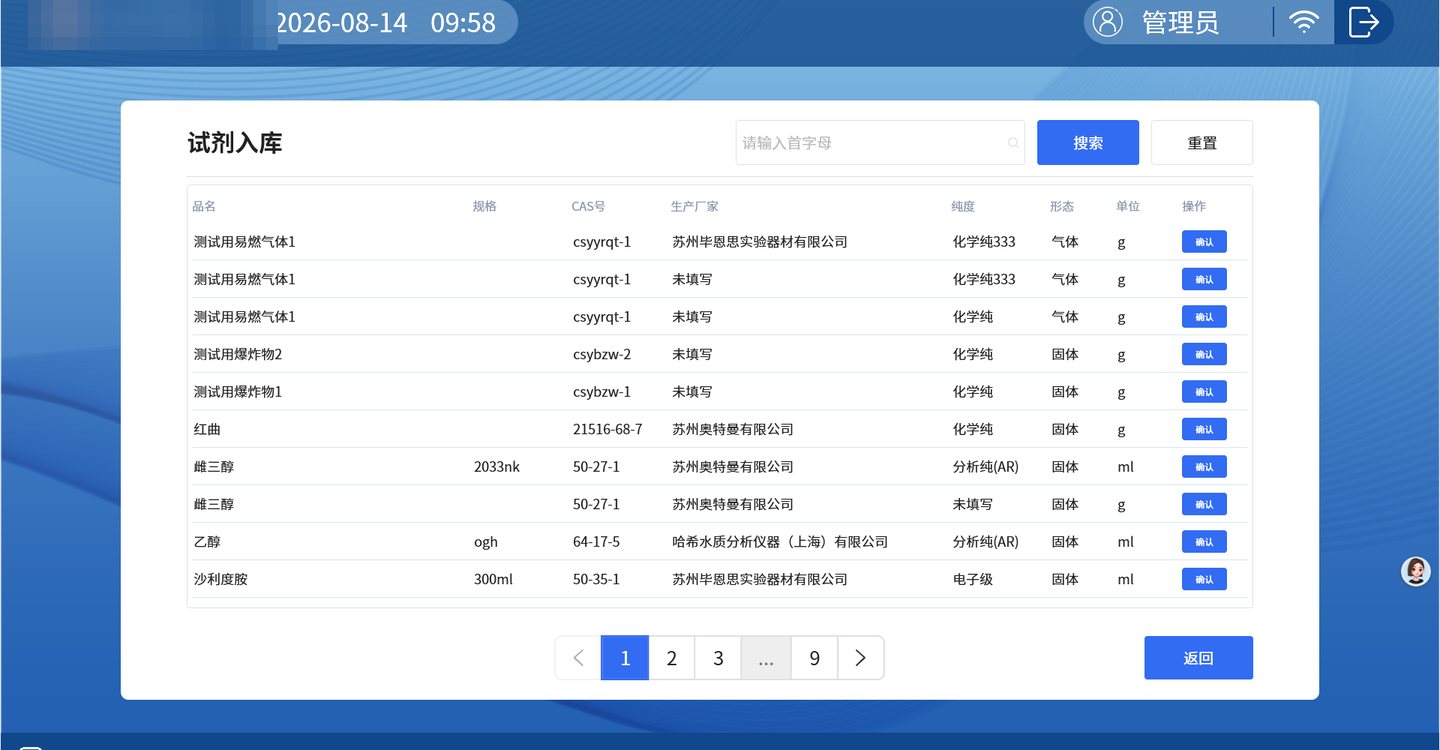
Inbound is the source of every number. One wrong character here and six record types inherit the error. The rule for this page: whatever can be carried in is never offered as a choice, whatever can be locked is never editable, and whatever must be typed gets a clear hint.
| Field | Comes from | Editable |
|---|---|---|
| Reagent name / CAS / owner / category | The pre-loaded reagent profile | No. Prevents mismatches and prevents anyone inventing a reagent on site |
| Unit mode / location / form / manufacturer / purity / spec | That reagent's previous configuration | Yes. Changes write back, so the next inbound defaults to the new value |
| Expiry / opening time / post-opening shelf life | Defaulted from the profile | Yes, or left unset for an unopened bottle |
| Inbound quantity | Operator input | Required; unit follows the mode (g / ml / bottle) |
| Tare / net weight | Live scale reading | “Tare” and “net” capture each value; the reading refreshes continuously |
Tare is the empty bottle, net is the reagent. Shown side by side, an administrator can see at a glance how much is left during stocktake. With a single number, someone always asks: is that with the bottle or without? Two numbers end the argument.
When one reagent arrives as several bottles, the next bottle continues from the same page instead of re-searching and refilling. At 40 seconds a bottle and 60 bottles a day, that is a lunch break — and one less duplicate entry is one less chance to mistype.
On success the thermal printer emits a label carrying the bottle's identity. An unlabelled bottle is undocumented: the next take cannot scan it, someone types the number by hand, and the chain breaks right there.
Worn, crooked or moved to another cabinet? A separate reprint module filters by cabinet or searches by initials and prints in batch — same number, unbroken history.
The inbound button is the only one on this page that takes effect immediately; a mis-tap puts a bottle into the books that does not exist. So its confirmation dialog is heavier than any other, and the wording says so.
Stocktaking
Two things ruin a stocktake: losing track halfway through, and realising the wrong cabinet was opened when it is already too late. So state is expressed as colour: red has not been counted, blue is confirmed. Progress is visible from across the room.
| Reagent | ID | Stock | Purity | Status |
|---|---|---|---|---|
| Monascus red | TEST20260804001 | 48.0 g | Chemical grade | Pending |
| Sulfuric acid | 1154580419 | 500.0 g | 68% | Pending |
| 2,4-Dinitrophenol | 126538876 | 200.00 ml | 98% | Pending |
| Ethanol | 1324258648 | 200.00 ml | 98% | In stock |
| Hydrogen peroxide | 1324293578 | 1 bottle | AR | In stock |
Illustration: red rows are pending, blue rows confirmed; stock figures are editable in place and turn the row from red to blue once confirmed.
By cabinet: pick a cabinet, scan bottle by bottle. The monthly full count, one cabinet at a time.
Single reagent: scan one bottle and correct its stock directly. For the moment someone says “this one looks wrong”.
The weighing area at the lower left shows tare and net weight live, so the administrator can check while counting: if the numbers disagree, the bottle was used without being recorded, or it is in the wrong slot.
Halfway through, the wrong cabinet is open or the shift changes hands: Reset returns every confirmed row to pending and the count starts again.
“Confirm” has no undo, though: once confirmed, anything not counted is written off as scrapped, stock zeroed, irreversibly. So the button sits bottom right, in the heaviest colour, behind a dialog — making an irreversible action slightly harder to press is basic hygiene in this kind of system.
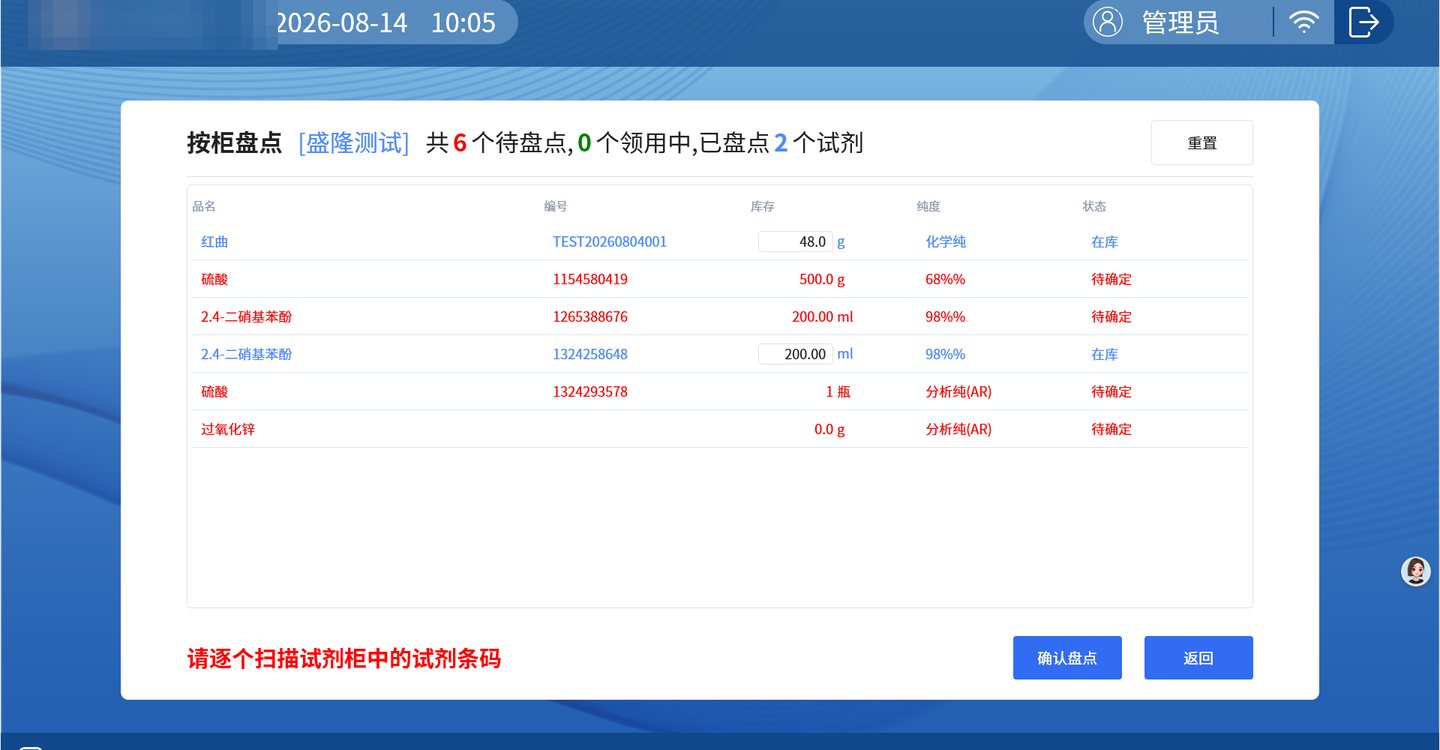 Interface de-identified
Traceability
When something goes wrong, the system must be able to look back; that is the floor for reagent control. Actions are split into six record types, each a table filterable by time, person and reagent; together they form a bottle's CV from arrival to retirement.
The six share their structure and differ in a few fields. Common fields: cabinet / location, ID, name, stock at the time of taking, time, person. “Unreturned” is the subtraction of receiving from return — what went out and never came back, on its own page, no cross-checking two tables by hand.
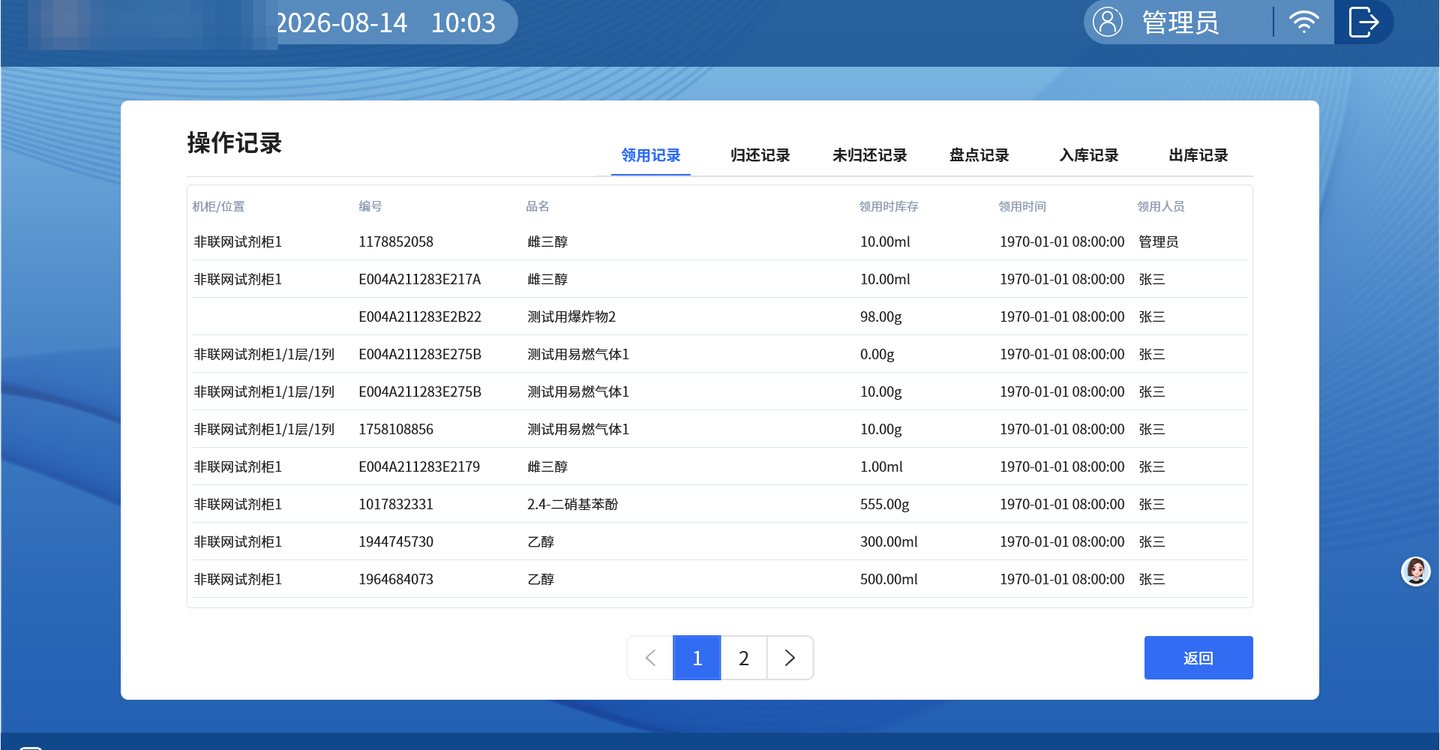
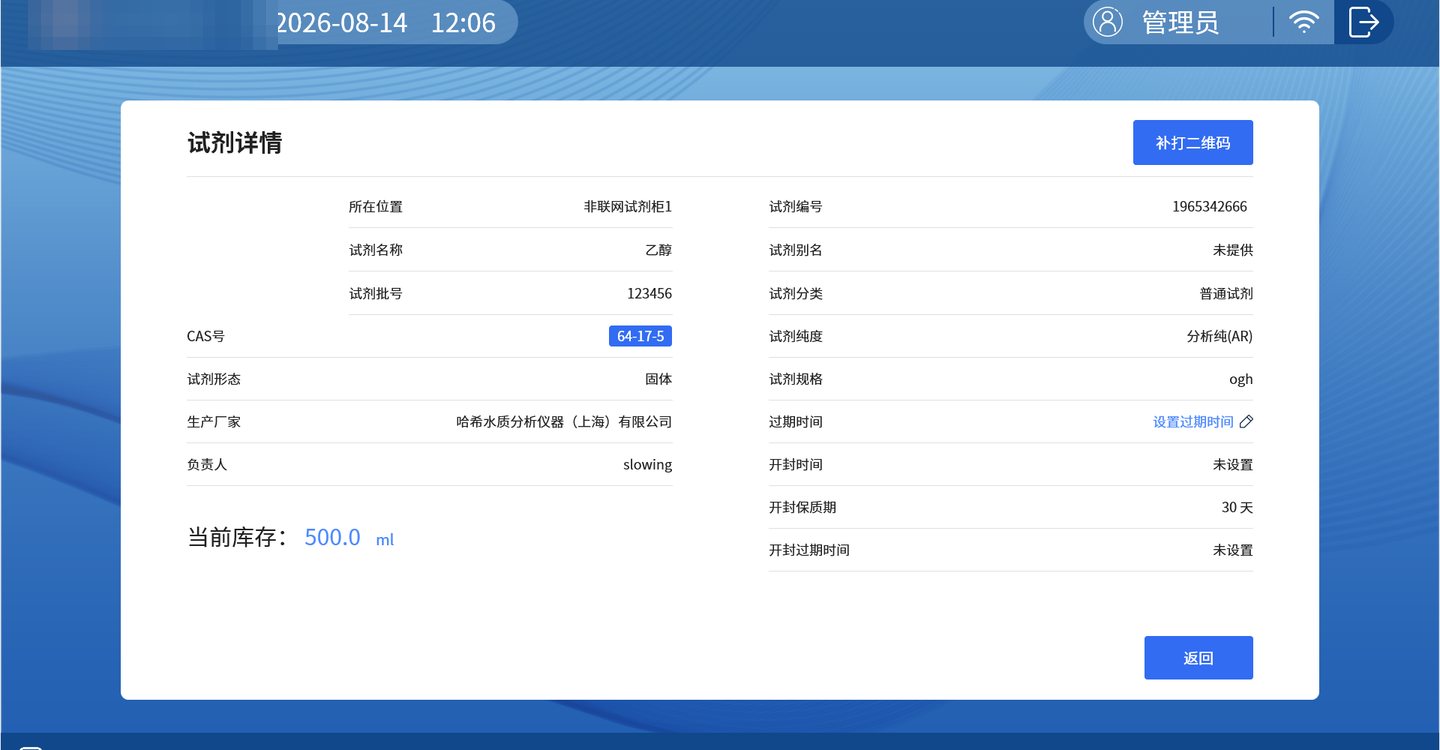
The CAS number on the detail page is a link to that chemical's safety data sheet. Looking up an MSDS is a daily move in a lab; putting it on the CAS number beats hiding it under a “documents” menu, because people look it up while holding the bottle, not while browsing files.
Storekeepers chase people with “unreturned”, safety officers close the month with “outbound”, administrators verify with “stocktake”, auditors read “receiving” to see who touched what and when. One data source, four uses, and nobody exports to a spreadsheet again.
Configuration
The usual failure in device software is not a missing feature, it is “it will not install at the next site”: different ports, a different balance, a different cabinet count, a different network. The answer here is unglamorous and effective — everything that varies goes into one JSON file.
{ "IsTest": false, // factory check only; off in production "WebApi": { "BaseUrl": "http://192.168.1.20:9353" // local / server IP / cloud domain }, "Cabinet": { "Com": "COM10", // board port, from Device Manager "Items": [ 1, 2 ], // chained board IDs "LoopSeconds": 20 // cabinets x 10; floor is cabinets x 5 }, "Card":    { "Com": "COM1" }, // reader port "Balance": { "Com": "COM8", "Cmd": "W", "ZeroRange": 120 }, // R on older balances, W on newer; zero range "FaceSetting": { "CameraWidth": 1280, "CameraHeight": 720, "CameraFps": 30, "CatchPicQty": 50, // liveness frames "CameraIndex": 0 // which camera, when there are several }, "Settings": { "HttpPort": 5000, // port exposed to the platform "AutoLogOffSeconds": 1200, // idle logout "DefaultPageSize": 8, // list page size "PrintSize": "large", // label size "BoardSize": 7 // 5-inch and 7-inch panels use different commands }
}
| Key | Default | How to change it on site |
|---|---|---|
| Cabinet.Com / Items | COM10 / [1] | Match the actual port and chained board count; add a board ID when adding sub-cabinets |
| Card.Com | COM1 | The reader's port, read off Device Manager |
| Balance.Com / Cmd | COM8 / R | R for older balances, W for newer; if no reading arrives, try this letter first |
| WebApi.BaseUrl | localhost:9353 | Local service, server room IP or cloud domain — pick one |
| AutoLogOffSeconds | 1200 | Shorten per lab policy; 300 s for a hazardous reagent room |
| PrintSize / BoardSize | large / 7 | Label and small-panel sizes; a 5-inch panel must be set to 5, commands differ |
Certificate of conformity, manual, one power cord, five access cards, five rolls of thermal paper. Five cards for five roles — administrator, storekeeper, safety officer, auditor, spare; five rolls cover acceptance testing, then reorder by part number.
1. Install and wire the cabinet; check every drawer signal;
2. Set ports and board IDs; run one polling cycle, all green;
3. Test the card and the face three times each, both keys in;
4. Print one label, stick it on a sample bottle, scan it back;
5. Walk the operator through inbound, take, return and dispose.
Delivery & FAQ
On device projects, eight out of ten questions are not about code; they are about whether the room will actually use it. These five came up most during commissioning and training.
MORE CASES
A 15.1-inch touchscreen terminal that folds lab reagent work into 13 modules: log in by card or face...
View Details →
A smart-factory mobile app (Android / iOS plus a web management backend) for a precision-electronics...
View Details →
A reagent supply-chain management system for a hospital clinical laboratory, extended from the deliv...
View Details →Start with our pricing logic, then let's talk requirements — cost structure, technology comparison and acceptance criteria, all laid out in the open.